.webp)





.webp)
SEO
Calculating...
Aug 2026
Programmatic SEO Tools: The B2B SaaS Stack for 2026
Programmatic SEO tools do four jobs: source data, generate pages, check quality, and monitor. Here is the lean B2B SaaS stack and what each tool is for.
.png)
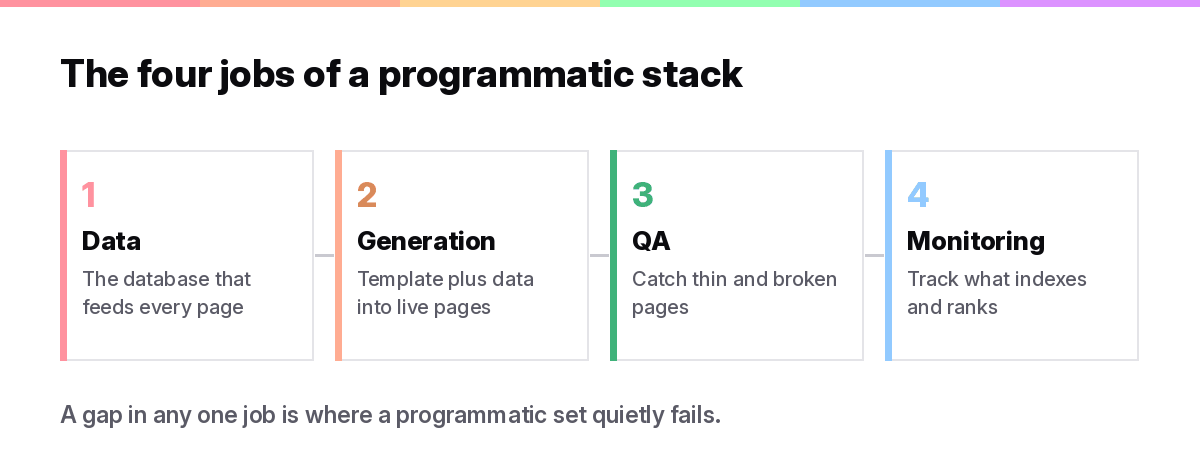
Programmatic SEO tools fall into four jobs: sourcing data, generating pages from a template, checking quality, and monitoring what indexes. A lean SaaS stack of a spreadsheet database, a CMS, a sync tool, and Search Console covers all four for a few hundred dollars a month.
This guide is organised by job, not by brand. It sits under our pillar on programmatic SEO for B2B SaaS, and it names the tools we actually reach for, along with the honest note that some jobs need no tool at all.
One principle first. Tools speed up a programmatic set, they do not design it. The judgment calls, the pattern, the data, the quality bar, still sit with you, and no platform replaces them.
The four jobs a programmatic stack has to do
Every programmatic SEO stack has to source data, turn that data into pages through a template, check the pages are good, and watch what indexes and ranks. Pick a tool for each job, or one platform that does several, but do not leave a job uncovered.
Stack, not single tool
The best setups are usually a stack. One tool holds the data, another generates pages, and a third tracks performance. All-in-one platforms exist and can be a fine starting point, but most mature sets end up modular because each job has a best-of-breed option.
Here is the field mapped to the four jobs, with rough price bands. Use it to spot which job you have not covered yet.
Add it up and a working stack lands in the low hundreds of dollars a month. That is the number worth keeping in mind, because it is far less than a development team and it is what makes programmatic SEO realistic for a lean B2B SaaS.
Data sourcing and enrichment
The data layer is the most important tool choice, because the data is the moat. Most teams run a spreadsheet database and enrich it from there.
The database: Airtable or Sheets
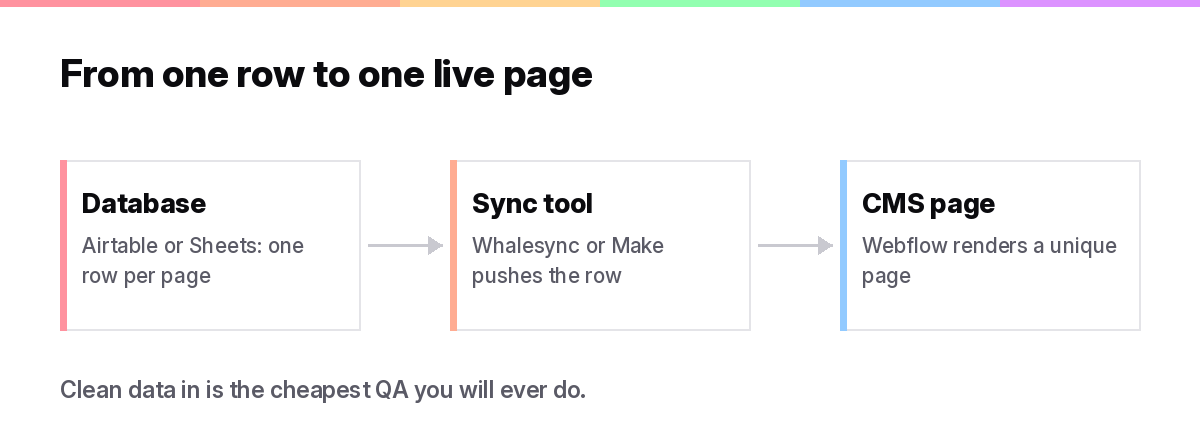
Airtable has become the default. It is not an SEO tool, it is the database that feeds everything else, one row per page and one column per template variable. Google Sheets does the same job for smaller sets and costs nothing. Either way, this is where your data lives and where quality starts.
Enrichment: turning thin data into pages worth reading
When your own data runs thin, enrichment tools fill the gaps. Clay pulls in firmographic and contact data, public data sets add structured facts, and a short expert note per category adds the human layer. The goal is a genuine reason for each page to exist, which we cover in our keyword research guide and our step-by-step build.
A warning on enrichment. Pulling public data into thousands of pages without adding anything is exactly what Google's scaled content policy targets. Enrichment has to add value a reader notices, not just pad a template, so treat these tools as a way to strengthen pages, not to manufacture them.
Keep the data clean at the source. A single messy column, a stray null, or an inconsistent label multiplies into thousands of broken pages once you generate, so we spend real time on validation rules in the database before anything reaches the template. Clean data in is the cheapest QA you will ever do.
Templating and page generation
Generation tools turn your data and template into live pages. The choice comes down to all-in-one platforms versus a modular CMS plus sync setup.
All-in-one: SEOmatic and similar
SEOmatic is built for programmatic SEO and bundles keyword research, dataset building, templates, publishing, and indexing in one place. All-in-one tools lower the setup effort, which suits a first project or a small team. The trade-off is less control and another platform your content lives inside.
The question worth asking before you commit is what happens if you leave. When the pages live inside a third-party tool, moving them later can mean rebuilding the set, so check how the platform exports and whether the URLs stay on your own domain. For a short-lived experiment that lock-in rarely matters. For a set you expect to run for years, owning the CMS is usually the safer call.
Modular: a CMS plus a sync tool
The setup we use most is a CMS such as Webflow or WordPress for the template, fed by the data through a sync tool like Whalesync, Make, or Zapier. WordPress users often reach for WP All Import instead. This keeps your pages in a CMS you own and gives full control over design and structure, at the cost of a bit more wiring up front.
There is no universally right answer. Start all-in-one if speed matters and the set is small. Go modular when you want control, own the CMS, and expect the set to grow. Both can produce pages that rank, so the deciding factor is usually your team, not the tool.
QA and quality control
QA is the job most teams skip, and it is the single biggest reason programmatic sets fail. The tools here are partly software and partly a human review layer that no platform replaces.
Automated checks
Screaming Frog crawls the set and flags duplicate titles, thin pages, broken links, and missing meta at scale. Ahrefs Site Audit does similar work in the cloud. These catch the mechanical problems fast, which frees your review time for the thing software cannot judge, whether the page is actually useful.
Run the crawl on the sample before you scale, not after. A crawl of the first 50 to 100 pages surfaces the template bugs that repeat across the whole set, so one fix there saves thousands of broken pages later. Then re-crawl after each publishing wave to catch anything the new data introduced.
The human review layer
Set a rule that no page publishes unless it clears a minimum bar of real data points, then review the first wave by hand. AI can draft faster, but every page still needs a person to confirm it earns its place. This is the discipline that keeps a set on the right side of Google, and it is worth more than any single tool in the stack.
Budget for it like a real line item. A rough rule we use is one hour of human review for every 100 pages in the first wave, dropping once the template is proven. That time is not overhead, it is the cheapest insurance a programmatic set can buy.
Monitoring, indexing, and refresh
Once pages are live, you watch what indexes, what ranks, and what to cut. The core tools here are free, and the discipline matters more than the software.
Indexation and performance
Google Search Console is the source of truth for what is indexed and earning impressions, and IndexNow speeds discovery of new pages. Ahrefs and similar tools track rankings and traffic across the set. Together they tell you which pages work and which are dead weight.
Watch indexation rate above all in the first month. A healthy set indexes most of its pages quickly, and a set where Google ignores half the pages is telling you the quality is too thin. That signal is free and early, so read it before you spend more on generating pages.
Refresh and prune
The last job is maintenance. Refresh pages when the underlying data changes, and prune pages that have had time to prove themselves and earned nothing. Some newer platforms fold refresh and AI-visibility tracking into the same tool, which is useful as AI search grows, a theme we pick up in programmatic SEO in the AI search era.
The verdict
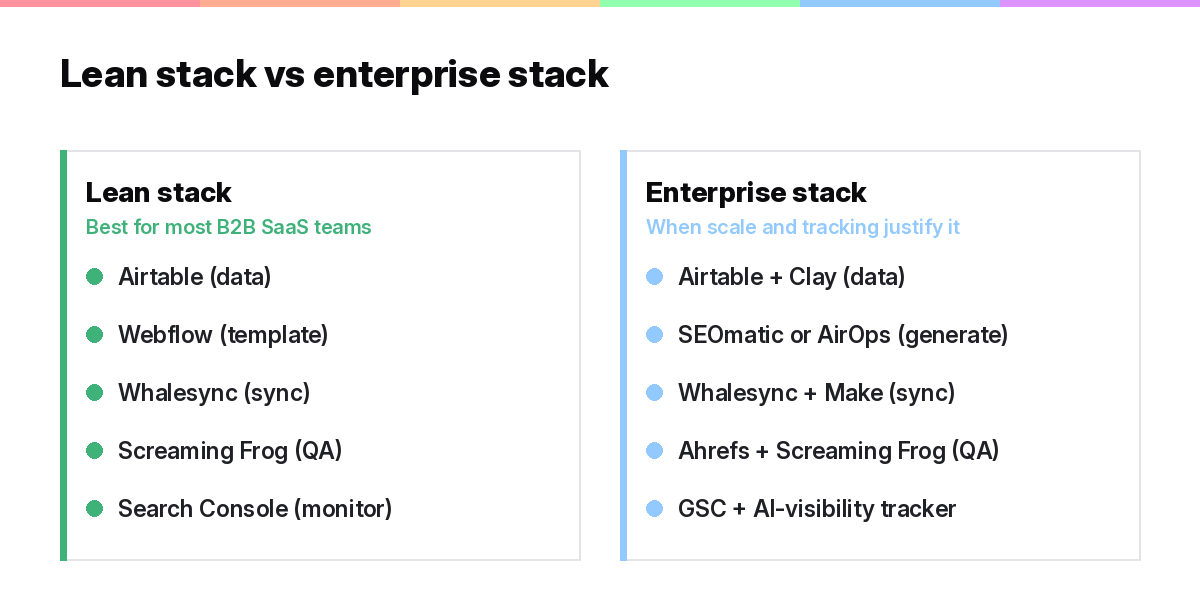
Pick one tool per job and resist buying more than you need. A lean, owned stack beats an expensive all-in-one for most B2B SaaS teams, and the money you save goes further on data and review, which is where programmatic SEO is actually won. If you want the stack built and run for you, our B2B SaaS SEO team does exactly that, or start from our examples teardown to see these tools in the wild.
Frequently asked questions
What is the best programmatic SEO tool?
There is no single best tool, because a programmatic set needs data, generation, QA, and monitoring covered. For most B2B SaaS teams a stack of Airtable, a CMS like Webflow, a sync tool such as Whalesync, and Google Search Console does every job affordably.
Are there no-code programmatic SEO tools?
Yes. Airtable plus Webflow plus a sync tool like Whalesync is a fully no-code stack, and all-in-one platforms like SEOmatic are built for non-developers. A marketer can run a real programmatic set without writing code.
How much do programmatic SEO tools cost?
A lean stack usually runs in the low hundreds of dollars a month once you combine a database, a CMS, a sync tool, and monitoring. That is far cheaper than a development team, which is part of why the tactic is accessible to smaller companies.
Can I use Webflow for programmatic SEO?
Yes. Webflow CMS is a common choice for the template layer, usually fed by Airtable through a sync tool like Whalesync. It gives you full control over design and structure while keeping the pages in a CMS you own.
Do I need an AI writing tool for programmatic SEO?
Not necessarily. AI can speed up drafting the variable content, but it is optional and risky if used without review. Every generated page still needs a human quality check, and the value comes from real data far more than from AI-written text.
Want this done for your brand? Get a free AI visibility audit.
Get my free AI visibility audit.png)
Latest articles
What we've published in the past 30 days — across SEO, GEO, content, and digital PR.