


GEO
Calculating...
Nov 2026
Does blocking AI training hide you from AI answers?
Blocking AI training and blocking AI answers are different switches. See what Google-Extended, Bing and GPTBot each block, and check yours before 2027.

Mostly no. Blocking AI training does not remove you from Google Search, and Google's AI Overviews and AI Mode have their own separate switch. At Bing and OpenAI, training and answers are separate settings too. The one catch is Google-Extended: it also covers grounding in Gemini Apps, so blocking it can take you out of Gemini's answers.
That catch is about to matter more. Here is how it usually goes: legal asks the website team to "block AI", someone adds a few lines to robots.txt, and nobody checks what those lines switch off. For a B2B SaaS company that wants to be named when buyers ask ChatGPT, Gemini or Copilot for a shortlist, flipping the wrong switch costs visibility you never meant to give up.
This guide is for founders, CTOs and marketing leads who have been asked to block AI: which switch does what, what to put in robots.txt, and a check to run before 2027.
What is the difference between AI training and AI answers?
AI training is when your pages are collected and used to build future AI models. AI answers (often called grounding, or search features) are when an AI system reads your page at the moment it writes a reply, and usually links back to you.
The two have very different value for a B2B SaaS brand. Training shapes what a model knows in general, months later, with no link and no credit. Answers are where buyers meet your brand today: a cited source in an AI Overview, a link in ChatGPT search. Blocking training is a reasonable choice for many companies. Blocking answers removes you from the places your buyers now research.
Most AI companies now give you a separate control for each:
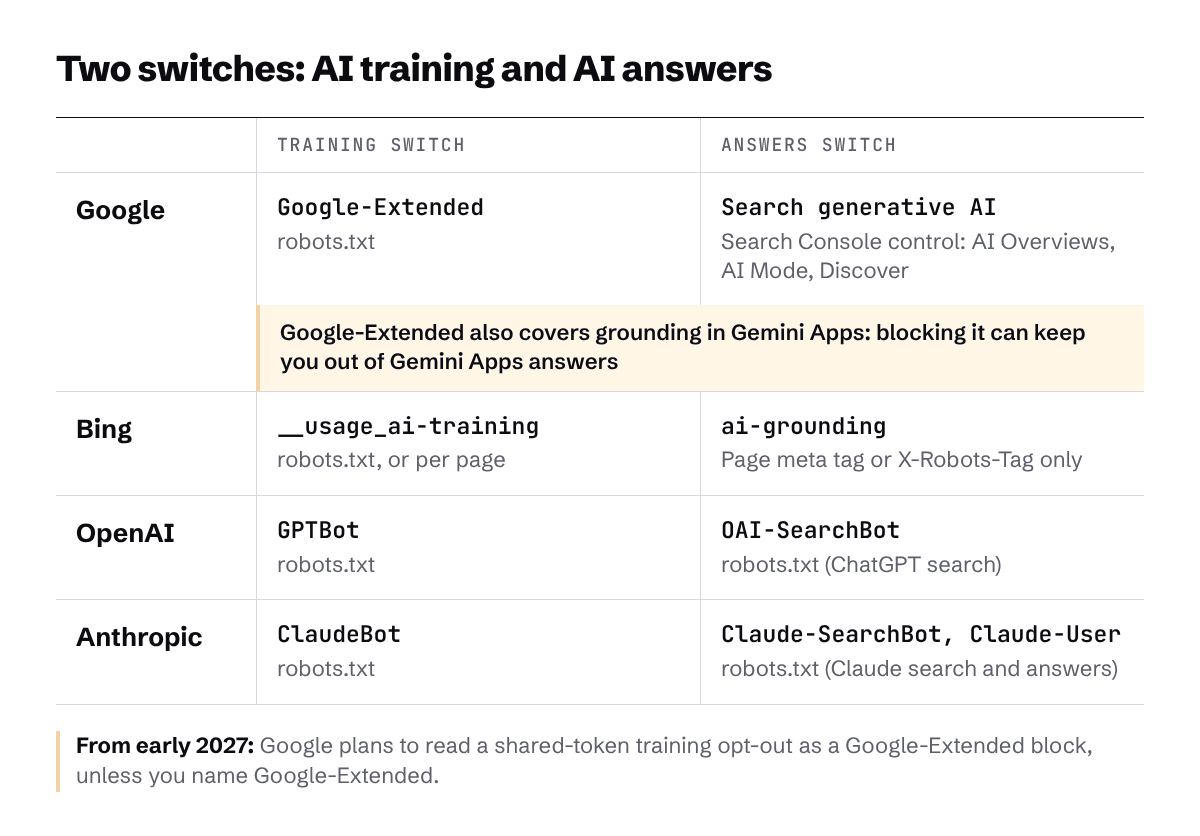
If you need the basics on which crawlers exist and what each one does, start with our guide to AI crawlers and whether to block them. This article covers only the new controls.
What does Google-Extended block?
Google-Extended blocks two things: the use of your content to train future Gemini models, and the use of your content for grounding in Gemini Apps and Grounding with Google Search on Vertex AI. It does not block Google Search.
Google's crawler documentation describes it as a product token that publishers use to manage whether content may be used for training future generations of Gemini models and "for grounding (providing content from the Google Search index to the model at prompt time to improve factuality and relevancy) in Gemini Apps and Grounding with Google Search on Vertex AI." The same page states that "Google-Extended does not impact a site's inclusion in Google Search nor is it used as a ranking signal in Google Search."
Google-Extended has no crawler of its own: Google crawls with its usual user agents and reads the Google-Extended line as an instruction about use.
The part most teams miss is the Gemini side. Google's 30 October 2026 announcement says it plainly:
So at Google, the training switch and the Gemini Apps answers switch are the same switch. If you block Google-Extended, accept that Gemini Apps may stop using and linking your pages.
How do you opt out of AI Overviews and AI Mode?
You opt out of AI Overviews and AI Mode in Search Console, under Settings, with the control called "Search generative AI". It is a separate switch from Google-Extended, and it does not affect AI training.
According to the Search Console Help page for the control, excluding your site keeps your content out of AI Overviews, AI Mode and generative AI features in Google Discover. Google rolled it out to all websites worldwide as of 31 August 2026. The page is clear on two points that legal teams often ask about: "This control doesn't affect AI training," and the control "isn't used as a ranking or inclusion signal affecting other parts of Search." Google says a change generally takes a few days to apply.
This means a training request should never be handled with the Search Console switch. If legal wants "no training", turning off AI Overviews and AI Mode does nothing for that goal and removes you from Google's AI answers. If you want to understand what you would be giving up, our guides to how Google AI Overviews choose sources and optimising for Google AI Mode explain how these features pick pages.
What is the shared AI training token coming in 2027?
The shared AI training token is a single robots.txt rule that tells every participating AI company not to use your content for training. Google announced on 30 October 2026 that it plans to support it, based on work by the AIPREF working group at the Internet Engineering Task Force (IETF).
In the announcement, Google explains that website owners will be able to use a shared "policy token" in robots.txt to set preferences across participating AI providers. Google says it aims "to support this new control along with other AI providers in 2027," and its crawler documentation says Google intends to support the signal, written as user-agent: __usage_ai-training, "in early 2027."
Here is the detail that turns a tidy shortcut into a trap. Google says that when a site uses the policy token to opt out of training "(and Google-Extended is not explicitly specified), Google plans to interpret that as if the publisher had disallowed Google-Extended."
Put that next to the previous section. A blanket opt-out with the shared token counts as a Google-Extended block, and Google-Extended also covers grounding in Gemini Apps. Our reading (this is our conclusion, not Google's wording) is that a site using the shared token to say "no AI training" will also drop out of Gemini Apps answers, unless it names Google-Extended separately. And naming it as allowed means allowing Google to train on your content. On the controls Google has published so far, you cannot opt out of Google's training and stay in Gemini Apps grounding at the same time.
What changed at Bing?
Bing now treats training and grounding as two independent choices, and neither one changes whether you appear in Bing search results. Krishna Madhavan, Principal Product Manager at Microsoft Bing, announced the change on 30 October 2026, the same day as Google.
According to Bing's announcement, "AI Training is the shared preference expressed in robots.txt for a site or path," using the same __usage_ai-training token, and it can also be set per page. Grounding works differently: it is a page-level preference only, set with a meta tag or an X-Robots-Tag HTTP header. "There is no site-wide robots.txt grounding preference." If you use HTTP headers for this, our glossary entry on the X-Robots-Tag explains how they work.
Bing is direct about the cost of turning grounding off:
Both preferences default to Allow when nothing is published. The dates to know:
- 15 December 2026: temporary grounding transition preferences open in Bing Webmaster Tools, only for sites using NoArchive or NoCache as of that date.
- 1 February 2027: Bing starts honouring the new preferences as it crawls.
- 1 March 2027: the deadline to act. After this date, NoArchive and NoCache are no longer read as a training or grounding preference.
- 30 September 2027: temporary grounding preferences expire (or earlier, when a page is recrawled).
If you rely on NoArchive or NoCache today to keep content out of AI, move to the new preferences before 1 March 2027.
What should you put in robots.txt?
Put in only the lines that match what you actually want, company by company. For most B2B SaaS companies that want to limit training but stay visible in AI answers, that means blocking the training crawlers and leaving the search crawlers alone.
OpenAI's crawler documentation says "Each setting is independent of the others," so you can disallow GPTBot (training) and still allow OAI-SearchBot, which surfaces sites in ChatGPT's search features. OpenAI notes that sites opted out of OAI-SearchBot "will not be shown in ChatGPT search answers," and that robots.txt changes can take about 24 hours to apply to search. Anthropic's Help Centre describes the same split: ClaudeBot collects content that may be used for training, while Claude-SearchBot indexes for search and Claude-User fetches pages when someone asks Claude a question. Anthropic says disabling either of those two may reduce your site's visibility in Claude's search results.
Here is what the first row looks like as robots.txt groups, using the tokens and syntax from each company's documentation:
Note what this example leaves out. It does not name Google-Extended, so once Google supports the shared token in early 2027, Google plans to read the last group as a Google-Extended block, with the Gemini Apps effect described above. If Gemini Apps answers matter to you more than Google training, add a Google-Extended group that allows access and accept the training trade-off. Make that choice on purpose and write it down.
Three things not to do:
- A blanket disallow for every user agent. A User-agent: * group with Disallow: / tells search engine crawlers to stay away too, which can take you out of Google and Bing results.
- Blocking OAI-SearchBot, Claude-SearchBot or Claude-User because they sound like AI. These are the crawlers that put you in AI answers.
- Using the Search Console AI control to answer a training request. It does not affect training and it removes you from AI Overviews and AI Mode.
One more point: llms.txt is not a blocking tool. It is a suggested file for pointing AI systems at your best pages, and our guide to llms.txt explains what it can and cannot do.
A 5-step check before early 2027
Run this check now, while the new rules are announced but not yet live.
- Ask legal what they actually want. No training, no AI answers, or both? Write the answer down, company by company if needed.
- List every AI line in robots.txt. Look for Google-Extended, GPTBot, OAI-SearchBot, ClaudeBot, Claude-SearchBot, Claude-User, __usage_ai-training and any User-agent: * group. Check each against the goal from step one.
- Check the Search Console control. Open Settings, then Search generative AI, and confirm it is set the way you mean it.
- Decide on Google-Extended before you use the shared token. If you plan to use __usage_ai-training in 2027, decide now whether to name Google-Extended, knowing that the choice also decides Gemini Apps answers.
- Measure before and after any change. Google's documentation on AI features and your website says AI Overviews and AI Mode traffic is reported in the Search Console Performance report, within the "Web" search type. Note your numbers before you change anything, then compare.
If AI Overviews may already be changing your traffic, our guide to telling whether AI took the click shows how to read that data.
The takeaway: choose the switch on purpose
Blocking AI training will not hide you from most AI answers, as long as you flip the right switch. The risk sits in one place: Google-Extended, which ties Gemini Apps answers to the training decision, and the shared token, which Google plans to read as a Google-Extended block from 2027 unless you name Google-Extended.
Treat any "block AI" request as two questions (training, and answers), answer each one deliberately, and check the result in your data.
Not sure which switches your site has already flipped? MADX Digital checks your robots.txt, your Search Console settings and how often AI assistants cite you in our free AI Search Visibility Audit.
Frequently Asked Questions
Does blocking Google-Extended remove me from AI Overviews?
No. Google-Extended does not affect Google Search, and AI Overviews and AI Mode have their own control in Search Console. Blocking Google-Extended does affect training of Gemini models and grounding in Gemini Apps, so it can remove you from Gemini Apps answers.
Does blocking GPTBot stop my site appearing in ChatGPT search?
No. GPTBot is OpenAI's training crawler, and OAI-SearchBot is the crawler that surfaces sites in ChatGPT's search features. OpenAI says each setting is independent, so you can block GPTBot and still allow OAI-SearchBot.
What is the __usage_ai-training token?
It is a shared robots.txt rule, based on the IETF AIPREF working group's work, that tells participating AI companies not to use your content for training. Bing will honour it from 1 February 2027, and Google says it intends to support it in early 2027. Google plans to treat an opt-out that does not name Google-Extended as a Google-Extended block.
Will opting out of AI Overviews hurt my Google rankings?
Google says the Search generative AI control is not used as a ranking or inclusion signal for other parts of Search. You lose the impressions and traffic that AI Overviews, AI Mode and Discover's generative AI features would have sent, but the control itself does not affect how your regular results rank.
Should a B2B SaaS company opt out of AI training at all?
That is a legal and commercial decision for each company. Many B2B SaaS companies can block training crawlers with little downside, as long as they keep the answer crawlers and controls switched on. The exception is Google-Extended, where blocking training also affects Gemini Apps answers, so weigh that one separately.
Want this done for your brand? Get a free AI visibility audit.
Get my free AI visibility audit
Latest articles
What we've published in the past 30 days — across SEO, GEO, content, and digital PR.