.webp)





.webp)
SEO
Calculating...
Oct 2026
SEO Migration for B2B SaaS: How to Move Your Site Without Losing Rankings or AI Visibility
How to run an SEO migration without losing Google rankings or AI Overview citations: when to migrate, redirect maps, launch day and 12 weeks of monitoring.
An SEO migration is any change to a website's domain, URLs, platform, structure or templates that affects how search engines crawl, index and rank it. Done well, it carries rankings, backlinks and AI citations across to the new site using a full URL inventory, one-to-one 301 redirects and 12 weeks of monitoring.
Site migrations have come up on a lot of our sales calls in autumn 2026. Usually it's a CMS move, a rebrand with a new site structure, or a plan to fold a regional site into the main domain. Every team asks whether the new site will keep the rankings they spent years building.
In October 2026 there's a second question attached to it. Google now shows an AI Overview on most US brand searches, and those answers are built partly from pages on your own site. A migration is the week those pages move, change or disappear.
When is a site migration worth the risk?
A site migration is worth the risk when the current site holds back growth in a way you can name, such as a CMS your team can't publish on, a domain that no longer matches the brand, or duplicate regional sites splitting your authority. If the main reason is that the site looks dated, a redesign on the same URLs carries far less risk.
Good reasons to move, and reasons to wait
Google's own guidance on site moves says to expect ranking fluctuations while it recrawls and reindexes the site. For a medium-sized site, it can take a few weeks or more before Google starts showing the new URLs instead of the old ones, and longer for large sites. That dip is a cost you pay up front, so the gain has to be bigger than a fresh look.
We'd wait if the move lands in your busiest quarter, if nobody owns the redirect map, or if the new site is still changing every week in staging. Google suggests timing a move for a period of lower traffic where you can. If you're mid-redesign and the URLs can stay as they are, our guide to website redesign SEO covers that lower-risk route.
Change one thing at a time
If you plan to move to a new domain, change your CMS and update the layout, Google's site move documentation recommends doing them one after the other instead of all at once. When three things change in one week and organic sign-ups drop, nobody can tell which change caused it.
We've written before about three website revamps that tanked traffic, along with two alternatives to a big-bang relaunch (lift and shift, and a gradual rollout). In our experience a staged plan looks slower on paper and is far quicker to recover from.
Which kind of migration are you running?
The table matches the moves B2B SaaS teams most often plan to the Google guidance that applies to each. If you're switching platforms, our CMS migration SEO guide goes into the platform-specific checks.
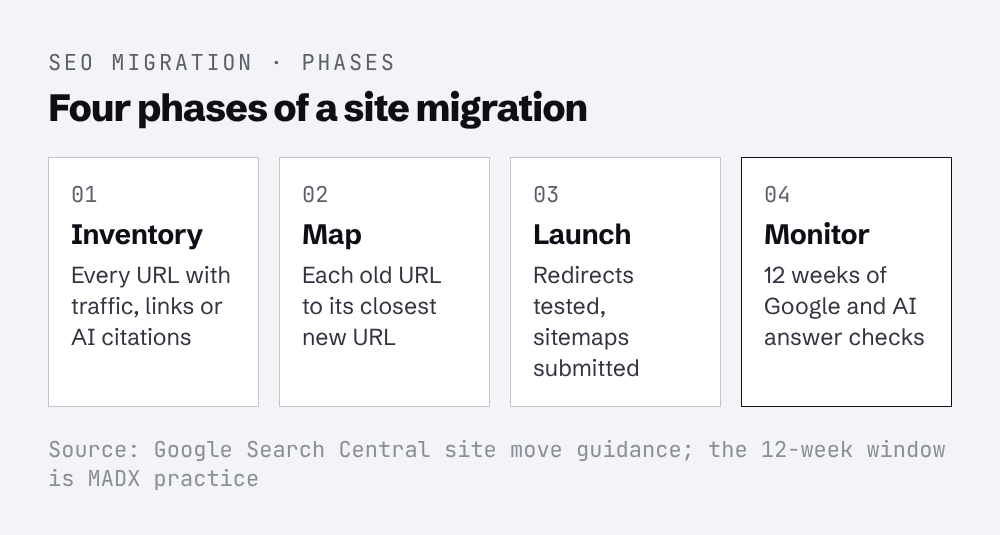
Whatever the type, we'd run the work in four phases, each with one named owner.
What breaks in a site migration?
Most migration losses come from URLs that change without a redirect, internal links that still point at old URLs, templates that drop content or structured data, and pages that AI answers were citing. In our experience the first two cause most of the damage, and they're also the easiest to prevent.
URLs, redirects and internal links
Google recommends server-side permanent redirects, such as 301 or 308, from each old URL to its new one, and states that 301 and other permanent redirects don't cause a loss in PageRank. It also asks you to avoid redirect chains. Googlebot can follow up to 10 hops, but Google advises keeping chains short, ideally no more than 3 hops and fewer than 5.
The other common miss is sending a pile of old URLs to the homepage because nobody had time to map them.
Internal links matter just as much. A redirect rescues the visitor, but every internal link still pointing at an old URL adds a hop and tells Google the old address is still in use. Google's advice is to update internal links on the new site using the same URL mapping you built for the redirects.
The pages AI answers were citing
SE Ranking's study of 1,000 US brand keywords, published 22 October 2026, found AI Overviews on 82.5% of US brand searches. For B2B SaaS and software brands, 78% of keywords showed an AI Overview in all three of its checks. The brand's own website supplied 33.8% of all AI Overview citations.
The cited pages weren't the ones a rank tracker usually watches. 62.2% of brand-site citations came from pages that didn't rank in the organic top 10 for that search, rising to 92.6% for product, service and category pages and 84.6% for About pages. Homepages made up 71.1% of brand-site URLs in the organic top 10, but only 36.8% of brand-site citations.

For a migration, that changes which pages you protect. A product page that ranks nowhere for your brand name can still be the page Google uses to describe what you sell, and if the redesign merges or drops it, the AI Overview changes with it. Our guide to protecting AI search visibility during a site migration covers how to build that list of cited pages.
Templates, content and structured data
New templates tend to drop things nobody wrote into the brief. Author boxes, last-updated dates, tables of contents, FAQ blocks and Article schema often live in the old theme and don't get rebuilt.
Those features are linked to AI citations. SISTRIX's citation worthiness study of 96,418 URLs in the DACH region, published 22 October 2026, compared cited and non-cited pages on the same domains. Pages with a table of contents were cited 1.7 times as often, pages with Article schema 1.6 times and pages with FAQPage schema 1.5 times. SISTRIX found no measurable advantage from llms.txt, so we wouldn't hold a launch for one.

Compare the schema on each new template with the old one before launch. Our post on structured data for AI search lists the schema worth adding for B2B SaaS.
Before launch: inventory, redirect map and benchmarks
Before launch you need a list of every URL with traffic, links or AI citations, a redirect map that sends each one to its closest new equivalent, and a benchmark of where you stand today.
Build the URL inventory
Google suggests starting with your important URLs. Pull them from your sitemaps, from server logs or analytics for the pages with the most traffic, and from the links report in Search Console for pages with internal and external links. Add a full crawl from a tool such as Screaming Frog and the URL list from your CMS, then remove duplicates.
Include files as well as pages. Google calls out images, videos, JavaScript and CSS as URLs that need moving like any other content, and its preparation steps mention downloads such as PDFs.
Write the redirect map
Each row should point to the closest equivalent page. If two old posts are merged into one new guide, both can redirect to it, and Google says that's fine for consolidated content. Our site migration checklist turns the mapping into checks with an owner each.
Benchmark rankings, conversions and AI answers
Before anything changes, export Search Console clicks and impressions by page, GA4 conversions by landing page and rankings for your commercial keywords. Then record what AI answers say for your brand name and your main category prompts, including which of your URLs they cite.
Commercial searches deserve the closest look. Semrush tracked 400 commercial keywords and found AI Overview coverage rose from 45.75% in September 2025 to 88% in August 2026. Software "alternatives" and "best X for Y" searches in software reached 100% keyword-weighted coverage.
If the site hasn't been audited in a while, do it now rather than after launch. A SaaS SEO audit before the move shows which problems already exist, so nobody blames them on the migration later.
Launch day and the first 72 hours
On launch day, switch on the redirects, test them in bulk, remove any staging blocks and submit the new sitemap. Then spend the next 72 hours fixing errors in order of how much traffic and revenue each old URL carried.
Switch on redirects and test them
Run the old URL list through a crawler in list mode as soon as the redirects go live. Every row should return a single 301 or 308 hop to a page that returns 200. Flag anything that returns a 404, chains through more than one hop or lands on the homepage.
Check robots.txt and noindex rules next. Google notes that some site owners block all crawling during development, and asks you to prepare the live robots.txt and a list of noindex rules to remove before the move starts. A staging disallow rule left in place can keep the whole new site out of search.
Once that crawl finishes, sort errors by the clicks and conversions each old URL had in your benchmark. A broken redirect on your pricing page matters more than 50 broken tag pages. Google also warns that it will crawl the new site more heavily than usual for a while, so give your host notice before launch and watch the server error logs.
Search Console on launch day
Verify every variant of the old and new sites in Search Console if you haven't already. For a domain change, submit a Change of Address for all verified variants of the old domain, including subdomains and www and non-www versions. Then submit the new sitemap.
Google also suggests submitting a sitemap of the old URLs alongside the new one, so you can watch indexing move across. Indexed pages in the old sitemap should fall towards zero as the new one rises, and Google says warnings about redirecting URLs in the old sitemap are normal.
The first 12 weeks: monitoring Google and AI answers
For the first 12 weeks, compare the new site against your benchmark every week, covering indexed pages, clicks and conversions by page, rankings and AI answers. Google says visibility can fluctuate during a move and settles over time, so judge trends across weeks rather than single days.
What to check in the first 4 weeks
Watch the page indexing report and both sitemaps. Re-crawl the redirect list once a week, because CMS changes after launch can break rules that worked on day one. Check the 404 report for old URLs nobody mapped and add them to the redirect map.
Keep the redirects in place. Google recommends keeping them for at least 1 year so it can transfer signals, and for users it suggests keeping them indefinitely. Update your highest-traffic external links, social profile links and ad landing pages to point at the new URLs.
Should AI answers be part of migration monitoring?
Some data says to keep this light. Marie Haynes looked at 12 months of GA4 data across 100 sites, published 21 October 2026, and found ChatGPT sessions were 0.62% of the volume Google organic sent. ChatGPT visitors converted at 13.8% against 3.02% for Google organic, yet Google still drove 96.5% of the total conversions across the channels she analysed.
The other side is that AI Overviews sit inside Google, and the SE Ranking data shows them reading your own pages on brand searches. Rand Fishkin, reviewing her study and two others on 22 October 2026, backed Mike King's view that AI behaves more like a brand channel and should be measured that way. That's how we'd treat generative engine optimisation (GEO), the work of earning citations in AI answers.
We'd protect Google rankings and conversions first, because that's where nearly all the conversions came from in her data. Then add a monthly check of AI answers for your brand and top category prompts, since a broken About or product page can change how Google describes you while rankings hold. Read the answers themselves, not GA4 referrals. Kevin Indig's analysis of 12 sites found Direct sessions with identifiable AI traces were only 0.003% of total direct traffic.
When is the migration finished?
Google treats a move as complete once Googlebot has visited every URL on the old and new site at least once, and there's no fixed timeline for that. We'd call it finished when the old sitemap shows close to zero indexed URLs, clicks and conversions by page are back at or above benchmark, and AI answers for your brand cite the new URLs.
If you want a benchmark of both before you start, our AI search and SEO audit shows where you stand in Google and AI answers today.
FAQ
How long does it take to recover rankings after an SEO migration?
Google says a medium-sized site can take a few weeks or more before it starts showing the new URLs instead of the old ones, and larger sites take longer. Rankings can fluctuate during that time. We'd run weekly checks against a pre-launch benchmark, investigate any page still down after 4 weeks, and judge overall recovery at 12 weeks.
Do 301 redirects lose PageRank?
No. Google's site move documentation states that 301 and other permanent redirects don't cause a loss in PageRank. What does lose value is a redirect to an irrelevant page, such as sending many old URLs to the homepage, which Google may treat as a soft 404. Map each old URL to its closest equivalent and avoid chains of more than one hop.
How long should I keep redirects after a site migration?
Google recommends keeping redirects for as long as possible, generally at least 1 year, so it can recrawl and transfer signals such as links from other sites. From a user's point of view it suggests keeping them indefinitely. Update your own internal links and your highest-traffic external links so fewer visitors have to pass through a redirect at all.
Should I change my domain and CMS at the same time?
Google recommends against it. Its guidance is to change one thing at a time, for example moving to the new domain first and changing the layout afterwards. If you change the domain, CMS and design in one launch and traffic drops, you can't tell which change caused it, which makes the fix slower. Staging the work costs time up front but is easier to debug.
Can a site migration affect AI Overviews?
Yes. In SE Ranking's October 2026 study, brand websites supplied 33.8% of AI Overview citations on brand searches, and 62.2% of those cited pages didn't rank in the organic top 10 for that search. If a migration drops or merges a product or About page that Google was citing, the AI Overview for your brand can change even when rankings look stable.
When do I need the Change of Address tool in Search Console?
Only when you move from one domain or subdomain to another, such as example.com to example.net. Google says you don't need it for HTTP to HTTPS moves, switching between www and non-www, or moving paths within the same domain. For a domain move, submit it for every verified variant of the old domain, including subdomains.
Want this done for your brand? Get a free AI visibility audit.
Get my free AI visibility audit.png)
Latest articles
What we've published in the past 30 days — across SEO, GEO, content, and digital PR.