
.webp)





.webp)
Content
Calculating...
Oct 2026
Content Pruning: When Deleting Pages Helps (and When Google Says It Won't)
Content pruning for B2B SaaS without the myths: what Google says about deleting old content, when merging beats deleting, and a safe redirect process.


Content pruning is the process of removing, merging, redirecting or noindexing pages that no longer serve your readers or your business. It helps when it clears out duplicate intent, thin pages and clutter. It doesn't help when it's done to make a site look fresh, and Google has said so directly.
Pruning has a reputation problem. Some SEOs swear by it and share charts of traffic jumping after a mass deletion. Others point to Google's guidance and call it a myth.
Both camps have evidence, and they're mostly talking about different situations. This guide separates them, then gives you the merge-first process we use on B2B SaaS sites. It's one step in our wider content audit process.
What is content pruning?
Content pruning is the deliberate removal or consolidation of low-value pages, using one of four actions: delete, noindex, merge or redirect. Which action you pick matters as much as the decision to prune at all.
Delete vs noindex vs merge vs redirect
Why pruning turned into an SEO myth
The myth took off in 2023, when CNET was reported to be deleting old pages to improve its search performance. MediaPost reported that Google's Search Liaison Danny Sullivan responded publicly that deleting content because Google supposedly dislikes old content isn't a thing, and that Google's guidance doesn't encourage it.
That exchange gets quoted in every pruning debate. What's usually left out is the nuance he added: removing a page might help a massive site get its other content crawled. That caveat is where the real answer sits.
What does Google say about deleting old content?
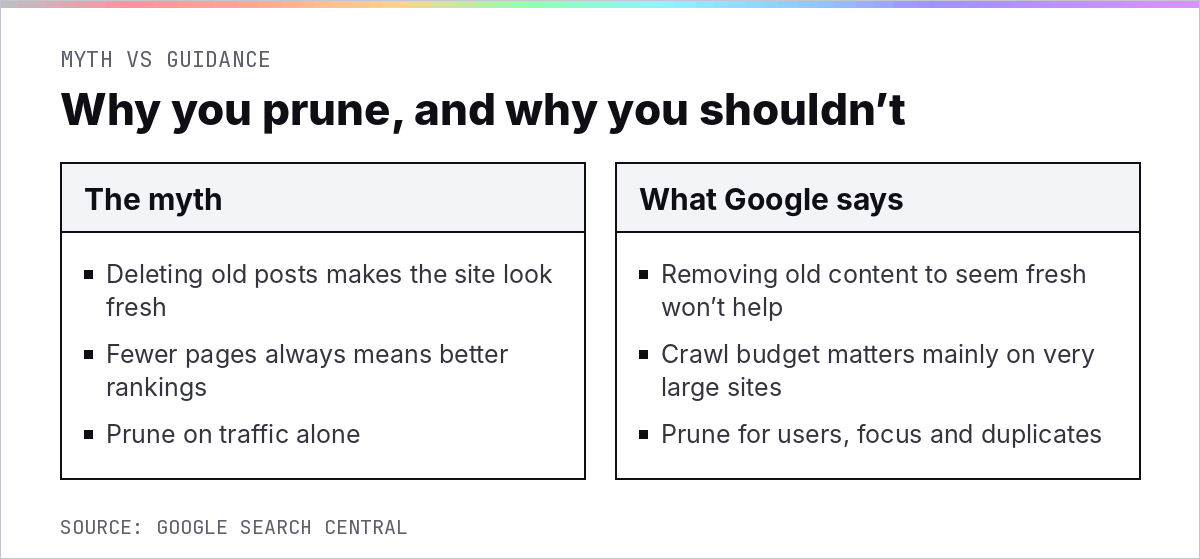
Google's position is that removing older content to look fresh won't improve rankings, but that very large sites can benefit from cleaning up what they ask Google to crawl. For most B2B SaaS sites, that second part doesn't apply.
The freshness myth in Google's own words
Google's guidance on helpful content includes a self-assessment question that addresses pruning head on:
That's as clear as Google gets. If the reason for a deletion is "old pages look bad", it's the wrong reason. Our breakdown of the helpful content update covers the wider context.
Where pruning helps: large sites and crawl
Google's crawl budget guide says it's intended primarily for large sites with 1 million+ unique pages whose content changes about once a week, and medium or larger sites with 10,000+ unique pages whose content changes daily. Google adds that these are not exact thresholds.
A typical B2B SaaS site with a few hundred posts isn't close to either. If you're pruning to save crawl budget on a 300-page site, you're solving a problem you don't have.
Google's John Mueller has also explained, as Search Engine Journal reported, that Google looks at content on a per-page basis, and that less popular content isn't something you need to block from indexing. Low traffic alone isn't a reason to remove a page.
When does content pruning actually work?
Pruning works when it removes duplicate intent, thin or outdated pages, and clutter that makes a site harder to use. The traffic gains people report almost always come from those fixes, not from deletion itself.
The evidence from real sites
Ahrefs collected several cases in its content pruning guide. Belkins pruned 400 pages, almost two-thirds of the site, and organic visits rose from 3,000 a month to almost 10,000, although other changes ran at the same time. A vehicle valuation platform went from 4,860,000 pages to 1,500, and organic visits rose by 160%.
IBM's Bryan Casey pruned over 1,000 pages from ibm.com's main navigation, with traffic unchanged and a clear win for users:
Notice the pattern. Each case removed duplication or clutter at scale. None of them deleted good pages because they were old.
Thin pages and duplicate intent
On SaaS blogs, the biggest pruning wins come from cannibalisation. Two or three posts written years apart for the same query split the links, the internal anchors and the AI citations. Merging them into one strong page usually beats keeping all three.
To find it, open Search Console's Performance report, filter to a query, and switch to the Pages tab. If two or more of your URLs keep swapping impressions for the same query month to month, you've found a merge candidate. Repeat that for your top 50 commercial queries and you'll usually have a short, obvious list.
This is also where topic architecture helps. A clear set of topic clusters makes overlap obvious, because two pages fighting for the same slot in a cluster stand out. Each cluster should have one pillar page and a handful of distinct supporting pages, not three versions of the same one.
Navigation and user experience
Pruning isn't only about search. Old event pages, retired product pages and outdated resource libraries clutter navigation and internal search. Removing or archiving them makes the site easier to use, which is the reason Google says it cares about.
A safe content pruning process for SaaS sites
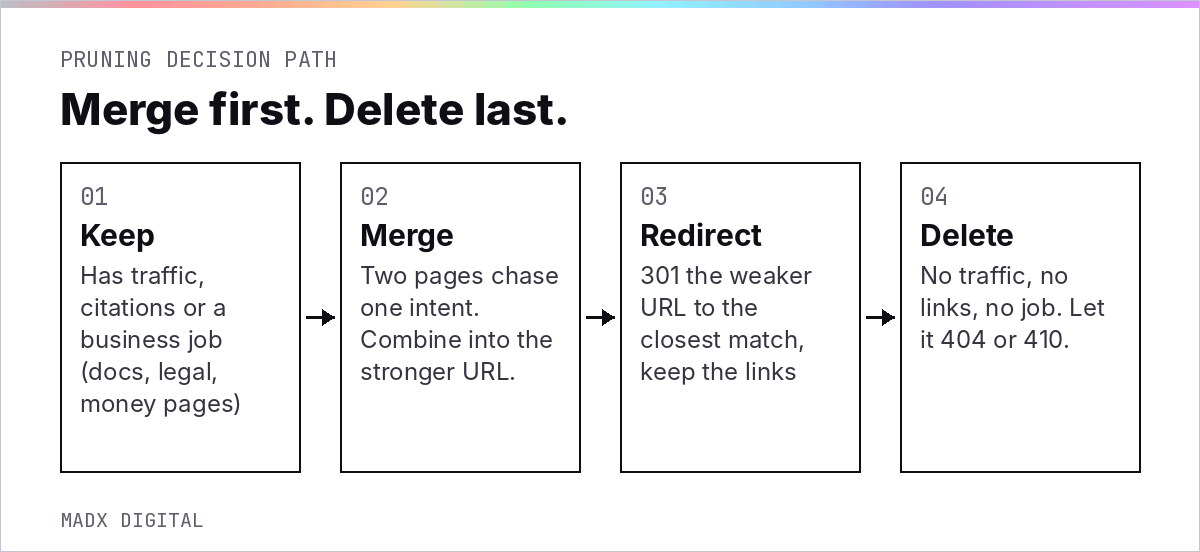
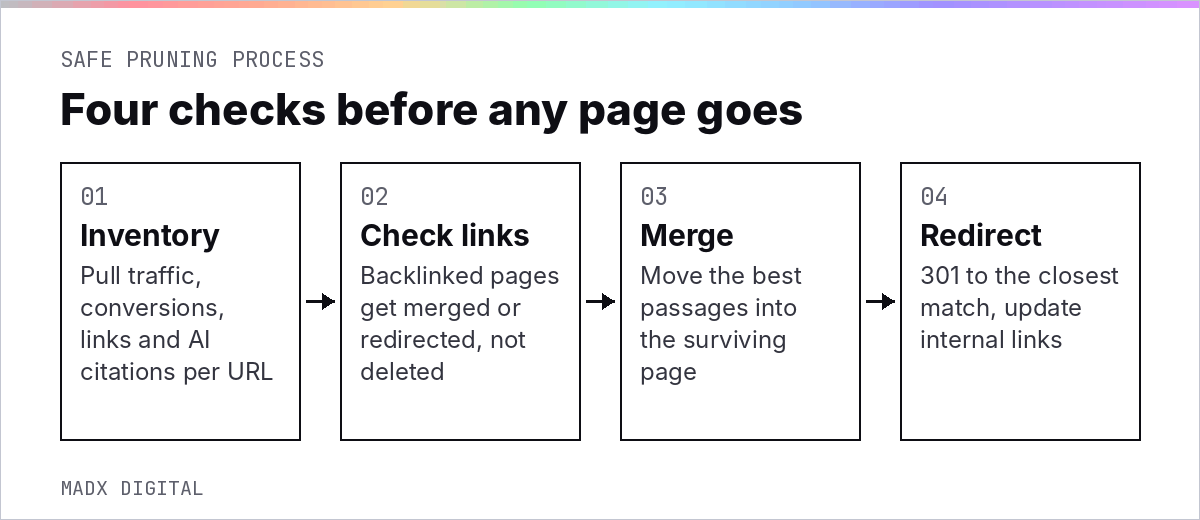
Inventory every candidate, check its links, merge it into the closest strong page where possible, and redirect it with a 301. Delete only what has no traffic, no links and no job.
Merge first, delete last
For each pruning candidate, ask whether any of it is worth saving first. A useful paragraph, a table or a definition can move into the surviving page. Merging keeps the value and gives you one URL to strengthen.
Pick the surviving URL by backlinks and rankings, not by which post is newest, and keep its slug. Our content refresh guide covers how to rebuild the surviving page.
Redirect rules and backlink checks
Check referring domains before you touch anything. Google's redirect documentation recommends a permanent server-side redirect whenever possible, and notes that the 301 and 308 status codes mean a page has permanently moved.
If you do delete, know what happens next. Google's HTTP status code documentation states that URLs that are already indexed and return a 4xx status code are removed from the index. Update internal links at the same time so you don't leave broken paths behind.
Pages you should never prune
Legal pages, security and compliance pages, integration pages, help docs and anything sales sends to prospects stay, whatever their traffic. They have jobs search data can't see.
Add one more group to that list: pages AI engines already cite. A low-traffic glossary page that ChatGPT uses as a source on a buyer prompt is doing real work, even if Search Console says nobody clicks it. Check your AI citation data before any page leaves the site.
How to measure the results of pruning
Measure at the level of the surviving pages and the site section, not the deleted URLs. Compare clicks, rankings and conversions for the merged pages over the six to eight weeks after the change, and check whether they start getting cited on the prompts they target.
Expect some noise in the first few weeks while Google processes redirects and drops removed URLs. Judge the result over two months, and judge it on the pages that remain. If the merged page climbs and the section's total clicks hold or grow, the prune worked.
Pruning decisions are easier when you've already spotted the decline. Our guide to content decay shows how to catch it early. If you'd rather start with a list of what to merge and what to keep, our AI SEO audit includes a pruning shortlist.
Frequently Asked Questions
What is content pruning in SEO?
Content pruning is removing or consolidating pages that no longer serve readers or the business. The four actions are deleting, noindexing, merging and redirecting, and the right one depends on each page's traffic, backlinks and purpose.
Does deleting old content improve SEO?
Not on its own. Google's guidance says removing older content to make a site seem fresh won't help rankings. Pruning can help when it removes duplicate intent, thin pages or clutter, which is where most reported traffic gains come from.
Should I delete or redirect old blog posts?
Redirect any post that has backlinks or a close replacement, using a permanent 301 redirect to the most relevant page. Delete only posts with no traffic, no links and no business purpose, and update internal links when you do.
How do I know which pages to prune?
Start from a content audit. Candidates are pages with little or no traffic over 12 months, no backlinks, no AI citations, and no role in sales or support, plus pages that compete with a stronger page for the same query.
Is noindex better than deleting a page?
Noindex suits pages that have a job for users, like gated resources or internal search results, but no search value. If a page has no job at all, deleting or redirecting it is cleaner than leaving a noindexed page live.
Does content pruning help AI search visibility?
Indirectly. Merging overlapping posts gives AI engines one clear, stronger source to cite instead of several weaker ones. Deleting pages that AI engines already cite can lose that visibility, so check citations before you prune.
Want this done for your brand? Get a free AI visibility audit.
Get my free AI visibility audit.png)
Latest articles
What we've published in the past 30 days — across SEO, GEO, content, and digital PR.


