


SEO
Calculating...
Nov 2026
CMS Migration SEO: Moving Off WordPress (or Anywhere) Without Losing Rankings
How to run a CMS migration without losing rankings: slug mapping, alt text, replacing SEO plugins, and which new pages to index, using WordPress to Webflow.

CMS migration SEO means moving a website from one content management system to another without losing search traffic. It covers mapping every old URL to a new one, moving content, images and metadata intact, rebuilding the jobs plugins did automatically (redirects, sitemaps, schema) and deciding which new pages search engines should index.
On WordPress, a lot of SEO work runs inside plugins. Yoast SEO, for example, adds structured data automatically, keeps the XML sitemap updated as you publish and, in Premium, redirects a URL when you change it. Move platform and those jobs stop on launch day unless someone rebuilds them.
When URLs change, Google's site move documentation includes a note in its setup steps that prefers the same CMS the old site used, so a platform switch on top is extra risk you take on deliberately. We use WordPress to Webflow as the worked example because several teams have asked us about it on recent calls. For benchmarks and the 90 days after launch, start with our SEO migration guide.
How do you map slugs when you change CMS?
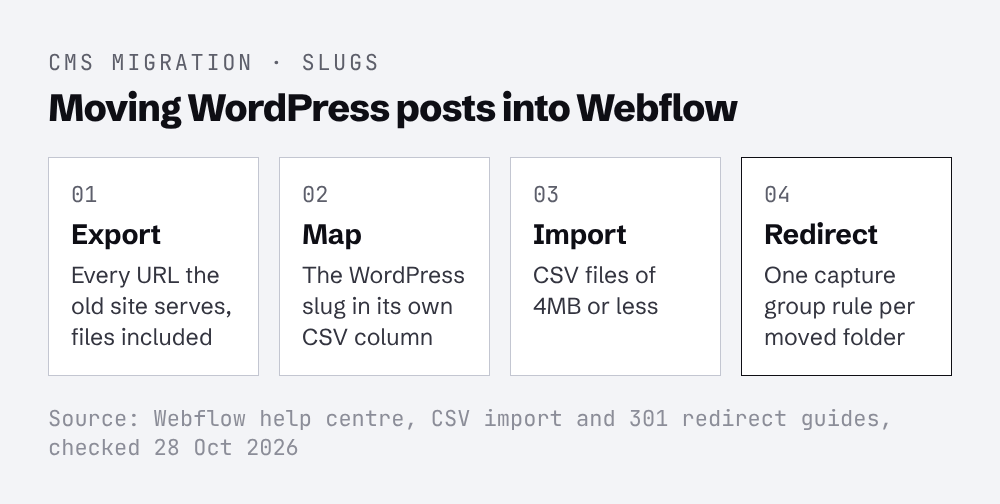
Export every URL the old CMS serves, decide each one's new address before importing anything, and keep the old slug wherever you can. Every URL that does change gets one 301 redirect to its closest new equivalent.
Export every URL, files included
WordPress creates more URLs than most teams expect, including category and tag archives, author pages, attachment pages and the uploaded files themselves. Pull the list from a full crawl, your sitemaps and Search Console, then mark each URL as keep, merge or remove. Google's site move guide lists images and downloads such as PDFs among the things to move, and removed URLs with no close match should return a 404 or 410.
Keep the old slug in the import
Webflow's CSV import guide says that if no column is mapped to the slug, the CMS generates one. Those won't always match, especially for posts retitled after publishing, so add the WordPress slug as its own column and map it to Slug.
Two limits shape the import. A CSV upload can be at most 4MB and item limits depend on your site plan, so a big blog may need several files. Reference fields such as author or category also match on slug, and Webflow won't find an item with a custom slug unless the CSV holds that exact slug.
When the folder has to change
Webflow serves Collection items inside a folder set by the Collection URL. Its Collections guide gives the example yourdomain.com/post/your-blog-post. If your WordPress posts sat at the root of the domain, every one of them changes address.
A folder-to-folder move needs one redirect rule with a capture group, such as /blog/(.*) to /post/%1. Root-level posts need a rule each, since a catch-all at the root would catch every other page too. Webflow's redirect guide sets no hard limit but recommends 1,000 redirects at most, which is a good reason to merge or retire thin posts before launch.
How do you move content, images and alt text?
Model one Collection per page type, import text and image URLs by CSV, then fill the gaps by hand. Downloadable files, responsive image sizes and alt text all need attention after the import.
Model Collections around page types
Case studies, integrations, glossary entries and comparison pages each become a Collection with their own template. Import the SEO title and meta description from your plugin into fields of their own, then use Webflow's SEO settings to pull them into each Collection page. A platform move is a bad week to rewrite titles, because you can't tell which change moved rankings.
Images, files and alt text
Webflow imports images from a direct URL, but images brought in by CSV or API don't get responsive variants (srcset and sizes), so import them already sized or upload them directly. File fields can't be mapped at all. Gated PDFs and other downloads have to be uploaded by hand and redirected from their old /wp-content/uploads/ addresses.
Alt text is easy to lose because the import guide doesn't mention it. Add a plain text alt field to each Collection, fill it from your WordPress media data and bind the image's alt text to it, as Webflow's alt text guide describes. Google's image guidance calls alt text the most important attribute for image metadata, so it's worth the extra column.
Which WordPress plugins do you lose, and what replaces them?
You lose whatever your SEO plugin did by default, usually redirects, XML sitemaps and structured data. Webflow has a place for each, but redirects and schema need a person to set them up and keep them current.
Redirects after launch
With Yoast SEO Premium, changing a URL creates the redirect for you. Webflow's redirect guide has you change the slug first and then add the rule yourself, so until someone does, the old address returns a 404. Writers used to WordPress won't expect that, so we'd add a redirect check to the publishing checklist.
Sitemaps and noindex
Webflow's indexing guide ties the per-page controls to the auto-generated sitemap, and the Sitemap indexing toggle only works when that sitemap is enabled. Turning the toggle off adds a noindex robots meta tag, and for a CMS item it also removes the item from the sitemap.
Schema
Webflow's schema guide describes generating schema with Webflow AI or writing your own JSON-LD in Page settings, and both work on Collection pages. Bind the Collection fields so each item gets its own values. Reference and multi-reference fields aren't supported there, so an author name may need a plain text field.
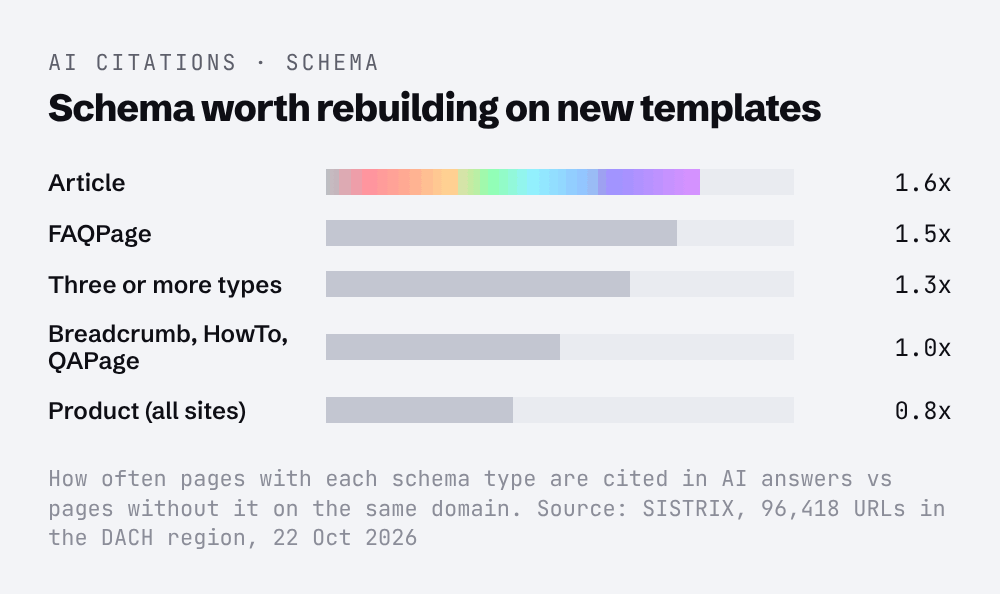
Rebuild the schema linked to citations first. SISTRIX's citation worthiness study of 96,418 URLs in the DACH region (Germany, Austria and Switzerland), published on 22 October 2026, compared pages cited in AI answers with non-cited pages on the same domain. Pages with Article schema were cited 1.6 times as often and FAQPage schema 1.5 times, while Breadcrumb, HowTo and QAPage markup showed no measurable difference.
A new Collection template lets you add Article schema once for every post, and Product schema to product pages. Our guide to schema and structured data for AI search lists the types we'd add for B2B SaaS.
Which templates, share pages and app pages should be indexed?
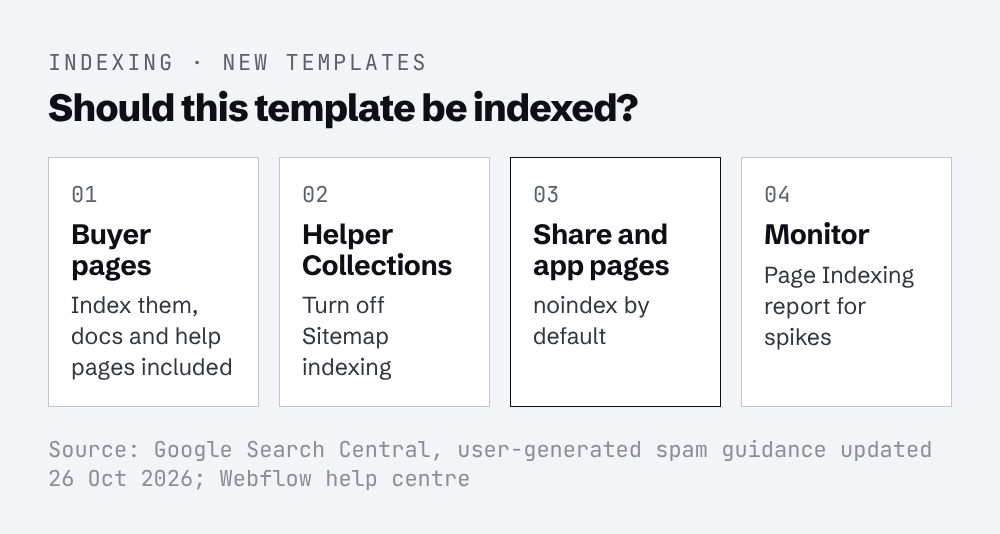
Index the pages you'd be happy for a buyer to land on from Google, and keep everything else out from launch day. Google's guidance on preventing abuse, updated on 26 October 2026, says pages made for direct sharing, collaboration or utility should be noindexed or blocked by default.
Marketing templates
A CMS move is the cheapest time to decide, because every template is built fresh. Case studies, integrations and glossary entries usually deserve to rank. A Collection that only holds logos or testimonials for other pages doesn't, so turn off Sitemap indexing on its items before launch.
Share links and app pages
If your product creates public pages (shared reports, dashboards, generated outputs), most are meant for people with the link. They usually come from the app rather than the marketing CMS, so set noindex there with the X-Robots-Tag header. Use one method per page type. Google's noindex documentation points out that a crawler blocked by robots.txt never sees the noindex rule, so the page can still show up in results when other pages link to it.
Should you index more pages or fewer?
Some teams index everything, and the data gives them a point. SE Ranking's study of 1,000 US brand keywords, published on 22 October 2026, found the brand's own website supplied 33.8% of AI Overview citations. Of the cited support, help and docs pages, 87.2% didn't rank in the organic top 10 for that search, so noindexing a help centre could cost answers you never knew it was giving.
The case for restraint is Google's new guidance and the crawling wasted on thin template pages. We'd index every page written for a buyer, docs included, and noindex anything generated by users or the product unless someone has decided it should rank. Record that call per template in the redirect sheet.
What to check in the week you switch
In launch week, crawl the old URL list, check one item from every template and submit the new sitemap. Then compare against your pre-move benchmark, investigate any page still down after 4 weeks and judge overall recovery at 12 weeks.
- Run every old URL through a crawler in list mode and confirm a single 301 to a page that returns 200.
- Check the title, meta description, canonical, alt text and schema on one item from each Collection template.
- Check the live domain's robots.txt. Webflow's option to keep the webflow.io subdomain out of search only publishes a robots.txt on that subdomain.
- Submit the new sitemap in Search Console and keep redirects for at least 1 year, as Google recommends.
- Watch the Page Indexing report weekly. Google's abuse guidance suggests alerts for spikes in newly published public pages.
Our site migration checklist turns these into tasks with owners. If the design is changing too, read our website redesign SEO guide first, since Google advises changing one thing at a time. More on how we work with B2B SaaS teams is on our SaaS SEO agency page.
FAQ
Will moving from WordPress to Webflow hurt my rankings?
It can, but most losses come from avoidable gaps rather than the platform itself. Expect some movement while Google recrawls, as its site move guidance warns. Keep slugs where you can, give every changed URL a 301 to its closest equivalent, rebuild schema on each Collection template and carry titles and meta descriptions across unchanged. Then compare against a pre-move benchmark, investigate any page still down after 4 weeks and judge overall recovery at 12 weeks.
Can I keep my WordPress URLs after moving to Webflow?
Partly. Static pages can usually keep the same path. Collection items such as blog posts sit inside a folder set by the Collection URL, so posts that lived at the root of a WordPress domain will change address and need redirects. Map the old slug into the CSV import so the last part of each URL stays the same, even when the folder changes.
Does Webflow add schema markup automatically?
Webflow's help centre describes two ways to add schema, generating it with Webflow AI in Page settings or writing your own JSON-LD, and both work on Collection pages. It doesn't describe automatic schema in the way Yoast SEO adds Article and Author schema to WordPress posts. Rebuild Article schema on each Collection template and bind the fields so every item gets its own values.
How do I move image alt text from WordPress to Webflow?
Webflow's CSV import guide doesn't mention alt text, so plan for it separately. Add a plain text alt field to each Collection, fill it from your WordPress media data, and bind the image's alt text to that field in the image settings. For images used on static pages, set alt text on the asset in the Assets panel and every instance inherits it.
How many redirects can Webflow handle?
Webflow's redirect guide sets no hard limit but recommends 1,000 redirects at most as best practice. Use capture groups where whole folders move, such as /blog/(.*) to /post/%1, so one rule covers many URLs. If you'd still be over 1,000, merge or retire thin posts before launch and let removed pages with no close match return a 404 or 410.
Should SaaS share links and app pages be indexed?
Usually not. Google's guidance, updated on 26 October 2026, says pages created for direct sharing, collaboration or utility should be noindexed or blocked from crawling by default. Use one method per page type, because Google can't see a noindex rule on a page that robots.txt blocks. Help docs and product pages are different, since they're written for buyers and often cited in AI answers.
Want this done for your brand? Get a free AI visibility audit.
Get my free AI visibility audit
Latest articles
What we've published in the past 30 days — across SEO, GEO, content, and digital PR.