





SEO
Calculating...
Oct 2026
Website Redesign SEO: How to Redesign Without Losing Traffic
Website redesign SEO for B2B SaaS: protect internal links, check AI citations before cutting pages, rebuild template elements and follow a launch checklist.

Website redesign SEO means protecting rankings, internal links and AI search citations while a site's design, navigation, templates or content change. Most redesigns keep the domain and many of the URLs, so losses tend to come from trimmed menus, cut pages and rebuilt templates rather than from missing redirects.
Teams we speak to often run a redesign as a design project and invite SEO to the last review before launch, after the sitemap workshop and template build have already made the decisions that move traffic. If your domain, platform or URL structure is changing as well, start with our SEO migration guide for B2B SaaS. This article covers redesigns that keep the domain and most URLs.
Why do redesigns lose traffic when the URLs stay the same?
Redesigns lose traffic because they change what Google finds on and between your pages, even when every address stays the same. New menus move internal links around, new templates change headings and schema, and content clean-ups remove pages that were earning visits or AI citations.
Where a redesign differs from a migration
A migration plan is built around the redirect map, since most of its risk sits in URLs that change. In a redesign the URLs often stay put and no redirect map gets built, so there's no single document where the losses would show up.
What our own revamp cases showed
We wrote up three website revamps that hurt traffic in an earlier post. The third case is closest to a typical redesign. That team kept the original URL structure and set up redirects for removed content, yet H1s changed, page speed dropped and rankings and traffic fell by around 50%.
Relaunch in one go or roll it out in stages?
A single website relaunch is easier to project-manage, with one launch date and no period of two designs side by side. The cost shows up when traffic drops, because every change shipped on the same day and none can be ruled out quickly.
A staged rollout changes one section at a time over several weeks, which is what we recommended for established sites in that revamp post, at the cost of a longer project. If organic search brings in most of your pipeline, we'd stage it, starting with blog templates and leaving the homepage and main navigation until last. If the site gets little organic traffic, ship it in one go.
Navigation and internal links
Navigation is where redesigns lose the most internal links, because the header, footer and sidebar link to the same pages from every URL on the site. When a new design trims the mega menu or the footer, some pages lose sitewide links that weren't on anyone's list.
Compare inlinks on the old site and the staging site
Crawl the live site and the staging site with the same tool and settings, for example Screaming Frog with the staging login added, and export the Unique Inlinks column for every URL from both crawls. Join the two exports on URL and sort by the size of the drop. A pricing page that goes from a link on every page to two links from old blog posts needs a new route in before launch.
Redesigns can drop pages below even that floor. Case studies, integration pages and older comparison posts often lived only in a footer column or a related-posts widget, and both get cut when a template is simplified. Any URL with zero internal links on staging is an orphan page, so either link to it from a relevant page or make a deliberate decision to retire it.

Make sure menus are links Google can crawl
New front ends sometimes build menus from buttons and JavaScript click handlers. Google's link guidance says it can generally only crawl a link if it's an <a> element with an href attribute, and that most links in other formats won't be parsed. Inspect a staging page and check that every menu item, dropdowns included, is an <a href> link.
Menu labels are anchor text too, so "Integrations" tells Google more than "Explore". Our guide to SEO-friendly website navigation covers which pages earn a place in the menu.
Content cuts: what to keep, merge or retire
Cut a page only after checking its organic clicks, backlinks and AI citations, because a redesign is usually when a team retires the most content at once. Pages with any of the three are kept or merged with a 301, and pages with none can return a 404 or 410.
AI Overviews lean on pages that rarely rank
SE Ranking checked 1,000 US brand keywords for its AI Overviews study, published 22 October 2026. An average AI Overview cited 2.57 pages from the brand's own website, against 1.72 brand pages in the organic top 10. Product, service and category pages made up 22.9% of brand-site citations but only 6.1% of brand-site URLs in the organic top 10, and About pages took 11.7% of citations against 3.8% of top 10 URLs.
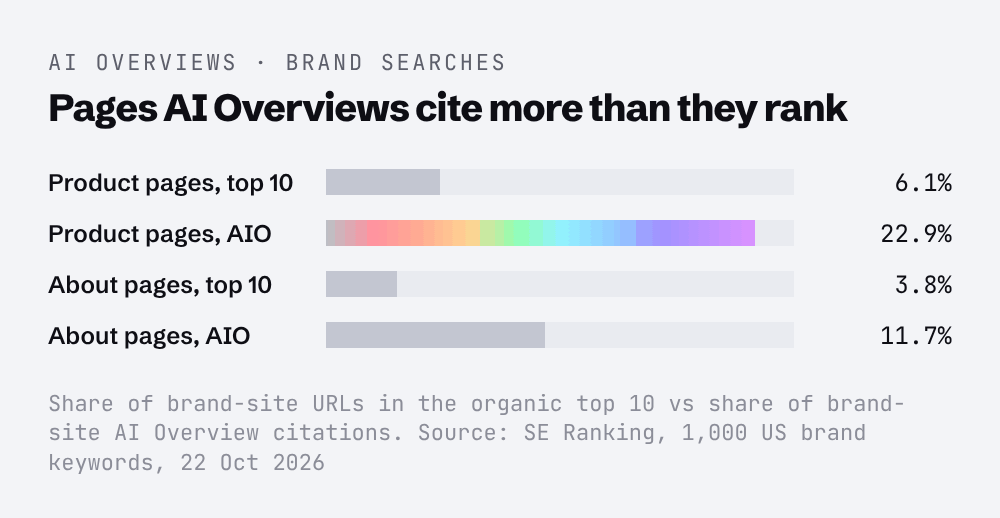
Those housekeeping pages are often the first to go in a clean-up, because they get little organic traffic and look dated next to the new design. Before you cut one, search your brand name and main product terms in Google and note which of your URLs the AI Overview cites. Keep those pages, or merge them into a page you're keeping. Our guide to tracking AI citations through a site change covers this in more depth.
A rule for each page
- Keep any page with organic clicks in the last 12 months, external backlinks or AI citations, and move it into the new design on the same URL.
- Merge pages that cover the same topic into the strongest one and 301 the others to it. Google's site move documentation says older URLs can redirect to a new consolidated page.
- Retire pages with no clicks, links or citations. Let them return a 404 or 410 instead of redirecting them to the homepage, which Google may treat as a soft 404.
When you shorten pages to fit a cleaner layout, keep the structure. SISTRIX's October 2026 citation study of pages in the DACH (German-speaking) region found that pages with at least 1,000 words were cited 1.5 times as often, but says the figure mainly reflects better structure, since longer pages carry more headings, tables and lists. So trim padding if you need to, but keep the comparison tables and H2s.
Templates and the elements new designs drop
New templates drop page elements that were never written into the design brief, such as H1s, author boxes, last-updated dates, tables of contents and schema. Write down what each old template outputs and check the new one against that list before launch.
Write an element list for every template
Take one URL from each template type (blog post, product page, integration page, docs article) and record what the live version outputs. That covers the title tag, meta description, H1, heading structure, canonical, breadcrumbs, author box, dates, table of contents, FAQ block and every schema type in the page source. Then load the same URL on staging and tick each item off.
The same SISTRIX study, published 22 October 2026, compared 96,418 URLs and found that only 14% of pages had a table of contents and only 5% showed a last-updated date. Pages that combined many of the features it tracked were cited 2.1 times as often as barely optimised pages on the same domain.

Headings, copy and page speed
Designers often rewrite H1s to suit a hero layout, so a heading such as "SOC 2 compliance software for startups" becomes a two-word slogan. On any page that ranks, keep the H1 and title tag close to the old wording. Check Core Web Vitals on staging too, because heavier hero video and animation libraries are common in redesigns, and page speed was one of the changes in the revamp case above.
Website redesign SEO checklist
A website redesign SEO checklist covers three windows: before launch (benchmarks, crawls and a decision for every page), launch week (staging blocks, redirects and sitemaps) and the four weeks after (traffic, inlinks and AI citations against the benchmark). Our SEO migration checklist has the full version with an owner for each check.
Before launch
- Export Search Console clicks and impressions by page for the last 12 months, plus GA4 conversions by landing page.
- Crawl the live site and save inlinks, H1s, title tags and schema for every URL.
- Record which of your URLs AI Overviews cite for your brand name and main product terms.
- Give every page a keep, merge or retire decision, and write a 301 for anything that moves or merges.
- Crawl staging with the same settings and compare.
Launch week
- Remove staging noindex tags and robots.txt blocks before the new site goes live.
- Crawl the redirect list and confirm each old URL returns one 301 to a page that returns 200.
- Submit the new XML sitemap in Search Console. Google's documentation says Change of Address isn't needed when you move paths within the same domain.
- Check that analytics and conversion tags fire on every new template.
The first four weeks
- Each week, compare clicks by page and rankings for your commercial keywords against the benchmark.
- Watch the 404 report in Search Console for old URLs that were missed in the mapping, and add them to the redirect list.
- At the end of the month, run the AI Overview check again and compare the cited URLs with your pre-launch list.
- Investigate any page still below benchmark after 4 weeks, and judge overall recovery at 12 weeks.
For a baseline before the designs are signed off, our free AI search and SEO audit shows where you stand in Google and AI answers today, so there's something to measure the new site against.
FAQ
Does a website redesign affect SEO?
Yes, even when the URLs stay the same. A redesign usually changes the navigation, the templates and the amount of content on each page, and all three affect how Google crawls and understands the site. The usual losses are pages that drop out of the menu, H1s and schema that change in the new templates, and pages cut during a content clean-up that were still getting clicks or AI citations.
Can I redesign my website without changing URLs?
Yes, and for most B2B SaaS sites it's the lower-risk route. Keep every URL that has organic clicks, backlinks or AI citations, and only change the design, templates and navigation around it. You then only need 301 redirects for pages you merge or move. Keeping URLs doesn't remove the risk, though, so compare internal links and template elements between the live site and staging before launch.
How long does it take for rankings to recover after a redesign?
There's no fixed timeline. In the revamp cases we published, one site was back at pre-revamp traffic after three months, while another, which delayed its redirects by 8 weeks, still hadn't recovered months later. Compare clicks by page against a pre-launch benchmark every week, investigate any page still down after 4 weeks, and judge overall recovery at 12 weeks.
Should I delete old blog posts during a website redesign?
Only after checking each post's organic clicks, backlinks and AI citations. Posts with any of those should be kept, or merged into a stronger post with a 301 redirect. Posts with none can be retired and left to return a 404 or 410. Avoid redirecting retired posts to the homepage, because Google may treat that as a soft 404 and visitors land somewhere they didn't expect.
Do I need to tell Google about a website redesign?
Not through the Change of Address tool, which is for moving to a new domain. Google's documentation says you don't need it when you move paths within the same domain. Submit the updated XML sitemap in Search Console, then use the page indexing report and URL Inspection to check that Google is crawling the new templates and that no staging noindex tags made it to the live site.
What should a website redesign SEO checklist include?
Before launch, it should include a benchmark of clicks, conversions and AI citations, a crawl of the live site and staging, and a keep, merge or retire decision for every page. In launch week it should cover removing staging blocks, testing redirects and submitting the sitemap. For the first four weeks, it should cover weekly checks of clicks, rankings and the 404 report against the benchmark.
Want this done for your brand? Get a free AI visibility audit.
Get my free AI visibility audit
Latest articles
What we've published in the past 30 days — across SEO, GEO, content, and digital PR.