
.webp)





.webp)
Content
Calculating...
Oct 2026
Content Audit Tools: What to Use for Each Step of a Google and AI Search Audit
The content audit tools B2B SaaS teams use for inventory, performance, decay alerts and AI citation tracking, with what each does well and where it falls short.
Content audit tools are the software you use to inventory your pages, pull their performance, flag decay and see whether AI engines cite them. For B2B SaaS, the core stack is a crawler, Google Search Console, GA4, and an AI visibility tracker that reports both brand mentions and page citations.
Most lists of content audit tools are a flat line-up of SEO platforms with a paragraph each. That doesn't help much, because the tools do very different jobs and you only need one per job.
So we've organised this by audit step, with what each tool is good at and where it falls short. Every feature claim below comes from the vendor's own site or documentation. If you haven't run an audit before, start with our content audit process for B2B SaaS and come back here to pick the tools.
What does a content audit tool need to do?
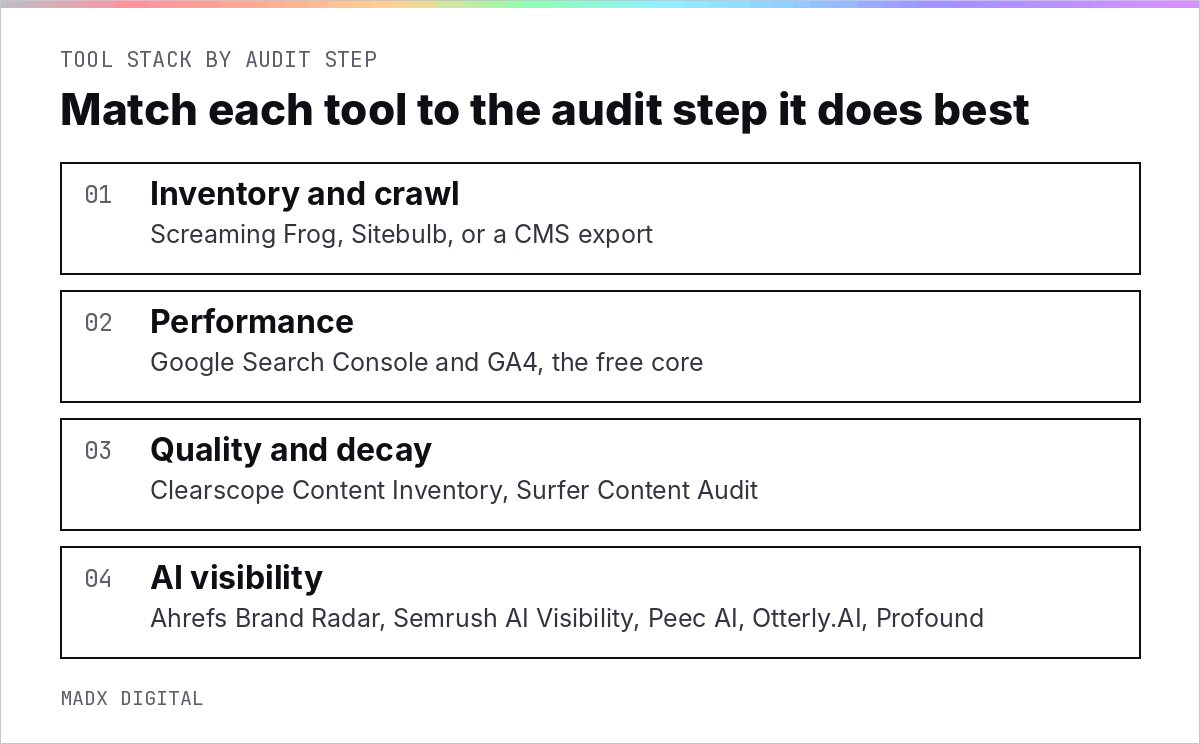
A content audit stack needs to cover four jobs: build the inventory, measure performance, judge content quality and decay, and track AI visibility. A fifth job, turning it all into decisions, still happens in a spreadsheet.
Why no single tool covers it
Crawlers see what's on the site but not how it performs. Analytics sees performance but not why. SEO platforms see rankings and links but often not AI citations. And none of them knows which pages your sales team sends to prospects.
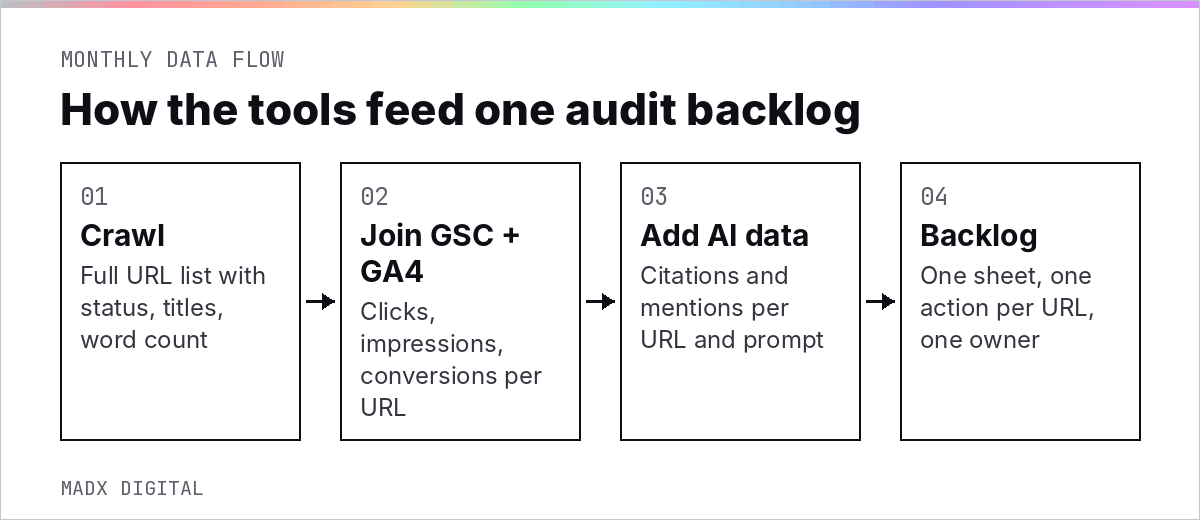
That's why we think in stages rather than platforms. Pick the best fit for each stage, then join the data on the URL.
It's worth getting right because audits are now a routine job, not a one-off. Semrush's content audit guide cites its 2023 State of Content Marketing report, where one-third of marketers said they run content audits twice a year.
Inventory and crawl tools
Use a crawler to build the full list of live URLs with their status codes, titles, word counts and internal links, then merge it with your sitemap and a CMS export. This is the foundation every other step joins onto.
Screaming Frog SEO Spider
Screaming Frog is the default desktop crawler for most SEO teams. Its own site states that the free version is restricted to crawling up to 500 URLs in a single crawl, and the paid licence unlocks features such as custom extraction and API integrations. For a SaaS blog of a few hundred posts, the free version can get you started.
Sitebulb
Sitebulb describes itself as making technical SEO easier and more accurate for professional SEOs, and its strength is clear visual reporting on crawl data. It offers a 14 day free trial, which is enough to run one full inventory and see whether its reports suit your team.
Your CMS export
Don't skip the CMS. A Webflow, WordPress or HubSpot export shows drafts, archived posts, authors and publish dates that a crawler can't see. It's also the quickest way to find old posts that were unpublished but never redirected.
Performance and decay tools
Google Search Console and GA4 give you search performance and business outcomes for free, and they're enough for most decay analysis. Paid content tools add page-level scoring and alerts on top.
Google Search Console and GA4: the free core
Search Console's Performance report shows clicks, impressions, position and queries per page. The default view covers the past three months, and Google's help documentation confirms Search Console keeps data for the last 16 months, which is what makes a year-on-year decay comparison possible.
GA4 adds what happens after the click. Google describes its Landing page report as a pre-made detail report that helps you understand how visitors interact with your website. Join it with your CRM and you can see which pages actually start pipeline.
Content scoring and decay tools
Several content tools now include audit features. Clearscope's Content Inventory is built to monitor, audit and refresh existing content. Surfer's Content Audit identifies pages that need re-optimisation based on page performance and its SEO score.
If you'd rather stay free, Ahrefs Webmaster Tools opens free access to Ahrefs' Site Audit and Site Explorer for verified websites, which covers backlinks per page and a decent view of rankings. For the technical side of the audit, our separate guide to SEO audit tools for SaaS websites goes deeper.
Whichever you choose, the job is the same: flag pages that are slipping before they fall off. Our guide to content decay explains the thresholds we use.
AI citation and mention tracking tools
AI visibility tools run a set of prompts across engines like ChatGPT, Perplexity, Gemini and Google's AI Overviews, then report where your brand is mentioned and which of your pages are cited. That's the column most content audits are missing.
It's also where your buyers are. G2's April 2026 research found 71% of B2B software buyers rely on AI chatbots at some point in their research process.
Mentions vs citations: you need both
The two signals do different jobs. On bottom-funnel prompts like "best [category] software for [use case]" or "[competitor] alternatives", the mention is what matters, because that's the recommendation a buyer acts on. Citations matter more for informational pages, where being the source builds trust and earns the click.
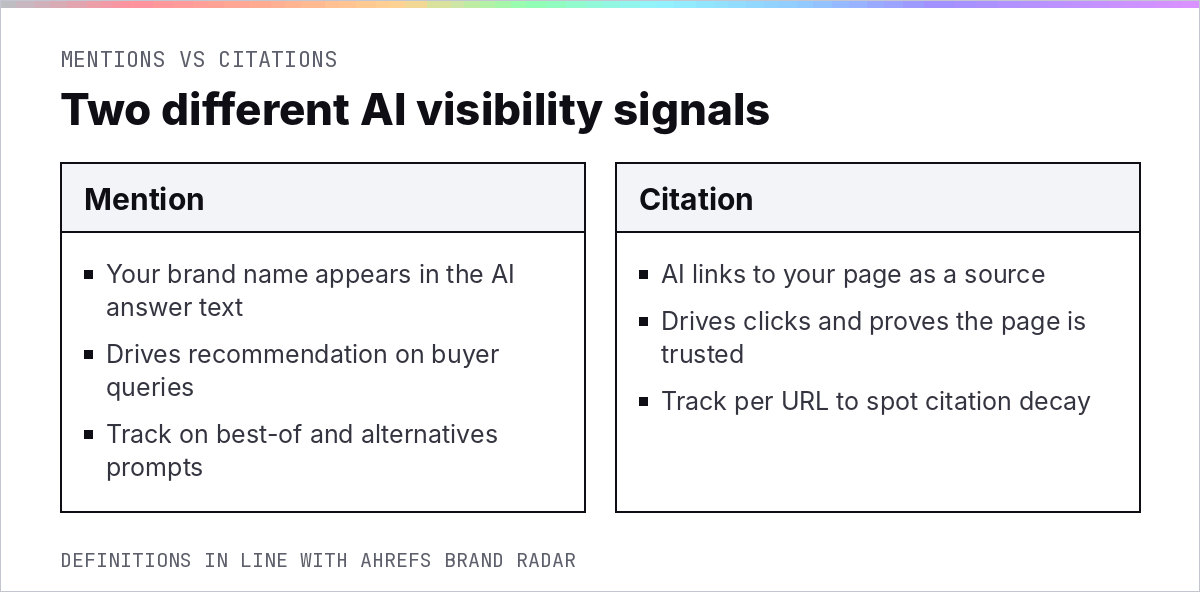
For a content audit, weight mentions on buyer prompts most heavily, because that's closest to revenue. Then use citations to judge individual pages: a page that's cited is doing its job, and a page that stopped being cited is a refresh candidate. Our guide to AI share of voice covers how to turn mentions into a trackable metric.
What the main trackers cover
Ahrefs Brand Radar reports mentions and citations across AI Overviews, AI Mode, ChatGPT, Perplexity, Gemini and Copilot. Otterly.AI tracks citations on seven AI search engines: ChatGPT, Claude, Perplexity, Copilot, Gemini, Google AI Mode and AI Overviews.
Peec AI says it tracks every mention of your brand across ChatGPT, Gemini, Perplexity, AI Overviews and AI Mode. Semrush's AI Visibility Overview gives a high-level view of your brand's presence across AI-generated search results, and Profound's Answer Engine Insights shows how your brand performs across AI answer engines.
Citation sets move fast, so track on a schedule rather than checking once. Our wider comparison of AI visibility tools covers pricing and set-up in more depth.
A lean content audit stack by team size
Most B2B SaaS teams need one crawler, Search Console, GA4 and one AI tracker. Add paid content scoring only when your library is big enough that manual review becomes the bottleneck.
There's a real debate here. All-in-one platforms promise fewer logins and one dataset. Best-of-breed stacks get better data at each step but need someone to join it.
Our verdict: for libraries under about 500 pages, a small best-of-breed stack joined in one spreadsheet is cheaper and more accurate. Above that, an all-in-one platform starts to earn its cost.
Solo marketer
Screaming Frog's free version, Search Console, GA4, and a manual check of 20 to 30 buyer prompts each month. It's slow, but it's free and it covers the essentials.
SaaS content team
A paid crawler licence, Search Console and GA4 joined to your CRM, Ahrefs or Semrush for links and rankings, and a dedicated AI tracker for prompt-level mentions and citations. This is the stack we see most often in the teams we work with.
Enterprise
An enterprise SEO platform with AI visibility built in, plus warehouse-level joins to product and revenue data. At this size the audit runs continuously rather than quarterly.
Freshness is the column most stacks miss. Seer Interactive found 75% of pages LLMs cite were updated in the last year, so record the last meaningful update by hand if no tool gives it to you.
Once the tools surface what needs work, the refresh itself is covered in our guide to content refresh, and our guide to content freshness explains which updates count. If you'd rather not build the stack yourself, our SaaS SEO agency runs it as part of every engagement.
Frequently Asked Questions
What tools do I need for a content audit?
At minimum: a crawler to build the URL inventory, Google Search Console for search performance, GA4 for engagement and conversions, and an AI visibility tracker to see which pages AI engines cite. A spreadsheet joins the data and records one decision per URL.
Can I do a content audit for free?
Yes, for smaller sites. Screaming Frog's free version crawls up to 500 URLs per crawl, Search Console and GA4 are free, and Ahrefs Webmaster Tools gives free access to Site Audit and Site Explorer for verified sites. AI visibility tracking is the part that usually needs a paid tool or manual prompt checks.
What is the best content audit tool for SEO?
There isn't one tool that covers every step. Google Search Console is the most important single source because it shows real clicks and queries per page. Pair it with a crawler for the inventory and an AI tracker for citations and mentions.
How do I track AI citations for my content?
Use an AI visibility tool such as Ahrefs Brand Radar, Peec AI, Otterly.AI, Profound or Semrush's AI Visibility reports. Build a fixed set of buyer and informational prompts, run them on a schedule, and record which of your URLs appear as sources.
What's the difference between an AI mention and an AI citation?
A mention is your brand name appearing in the text of an AI answer. A citation is the answer linking to your page as a source. Mentions matter most on buyer queries, where they act as recommendations, and citations show which pages AI engines trust.
How much data does Google Search Console keep?
Google's help documentation says Search Console keeps data for the last 16 months. The Performance report shows the past three months by default, and you can change the date range to compare year on year.
Want this done for your brand? Get a free AI visibility audit.
Get my free AI visibility audit.png)
Latest articles
What we've published in the past 30 days — across SEO, GEO, content, and digital PR.


