.png)
.webp)





.webp)
Content
Calculating...
Oct 2026
Content Decay: How B2B SaaS Teams Spot It Before Pipeline Feels It
Content decay explained for B2B SaaS: the causes, the GSC and AI-citation signals that catch it early, and the fix-or-let-go call for each decaying page.


Content decay is the gradual decline in a page's organic traffic, rankings or AI citations after it peaks. On B2B SaaS sites it usually comes from fresher competitor pages, shifting search intent, product changes that make a page wrong, and AI answers taking the click. The fix depends on which kind of decay you're looking at.
Every content team knows the feeling. A post that brought in demo requests for two years quietly halves its traffic, and nobody notices until a quarterly report. By then it's often been replaced as the source AI engines cite as well.
This guide covers how to spot decay early, how to tell which kind you have, and how to decide whether a page is worth saving. It sits inside our wider content audit process for B2B SaaS.
What is content decay?
Content decay is a sustained loss of performance on a page that used to do well. It's measured against the page's own peak, not against other pages, and it only matters when the page still has a job to do.
Traffic, ranking and AI citation decay
Most guides treat decay as one line on a chart going down. In practice we see three different patterns, and each one points to a different cause and fix.
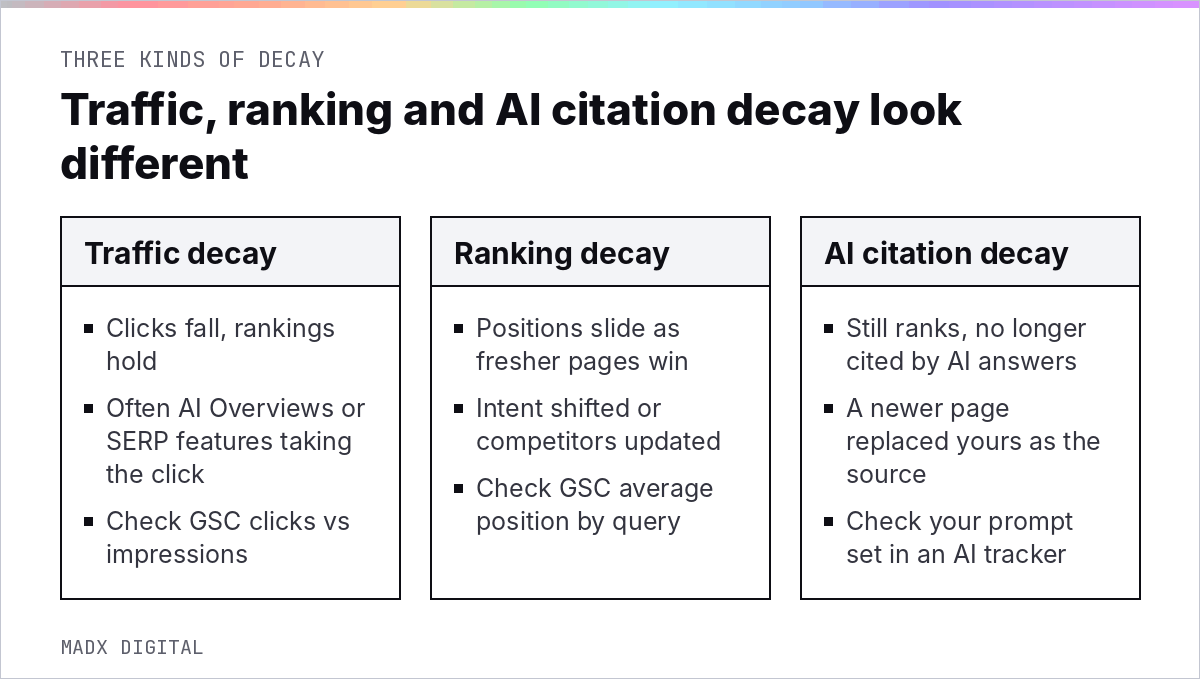
Traffic decay is when clicks fall while rankings hold. Ranking decay is when positions slide because something better or fresher has appeared. AI citation decay is the newer one: the page still ranks, but ChatGPT, Perplexity or Google's AI Overviews have stopped using it as a source.
That third kind is invisible in Search Console. You only see it if you track prompts, which is why so many teams miss it until their brand stops appearing in AI answers on buyer queries.
Normal decline vs a real problem
Some decay is simply the life cycle of a post. Animalz, which has studied this for years, describes content moving through five phases: spike, trough, growth, plateau, and decay.

Their 2018 analysis of AdEspresso data tracked a weekly decay rate averaging minus 1.21% per week, and found a single refresh produced 30,000+ additional pageviews. Decline is normal. What matters is whether it's happening to a page your pipeline depends on.
What causes content decay on SaaS sites?
Most decay on SaaS sites comes from four causes: fresher competitor pages, a shift in what the query means, product changes that make your page inaccurate, and AI answers absorbing clicks. Diagnosing which one applies is the whole game.
Fresher competitors and shifting intent
Search results move more than most teams assume. In Ahrefs' guide to content decay, the results for "how to start a blog" saw 13 changes over a year, with a SERP similarity of just 31 out of 100. In another example, Reddit forum posts went from 34% of page one to 60%.
When intent shifts like that, refreshing the same page in the same format rarely works. You need to match what's now ranking, which sometimes means a different structure altogether.
Product changes that make pages wrong
This one is specific to SaaS, and it's the most common cause we find. A feature gets renamed, a pricing tier disappears, an integration ships, and the old screenshots and claims stay live. Readers notice, and so do AI engines that compare your page with your current docs.
It's also the easiest to prevent. A shared list of product changes each quarter, checked against your top pages, catches most of it.
We ask product marketing for a short release summary at the end of each quarter, then search the site for every renamed feature, retired plan and changed limit. It takes an hour and usually turns up a dozen pages making claims that are no longer true.
AI answers taking the click
Sometimes the page hasn't lost anything except clicks. Seer Interactive's November 2025 update found organic CTR for informational queries with AI Overviews fell from 1.76% to 0.61% between June 2024 and September 2025, a 61% drop.
That's traffic decay with stable rankings. The fix isn't to rewrite the page; it's to make sure the page is cited in the AI answer that now sits above it. Our piece on zero-click searches covers how to value that visibility when clicks don't follow.
How to detect content decay early
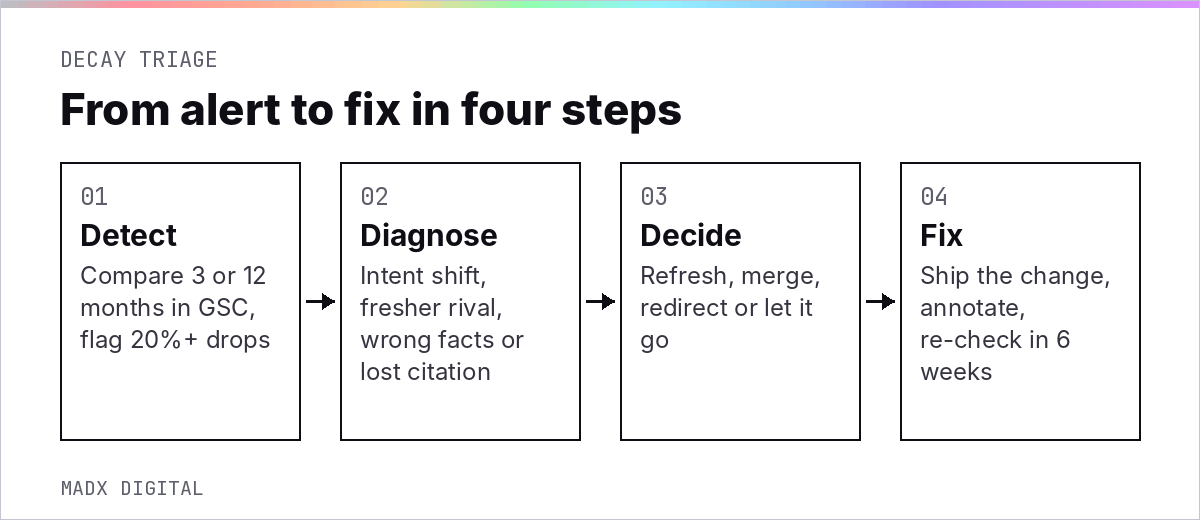
Compare each important page against its own past every month, in Search Console and in your AI prompt tracking. Flag anything that's dropped more than 20% year over year, then check it isn't seasonality or a tracking change before you act.
The Search Console comparison
In Search Console's Performance report, compare the last three months with the same three months a year earlier, filtered to pages. Google's own help documentation confirms Search Console keeps data for the last 16 months, so a year-on-year view is always available.
Ahrefs suggests flagging pages that dropped more than 20% in traffic year over year, and we use the same threshold. Sort by absolute clicks lost, not percentage, so a small page losing half its ten visits doesn't outrank a money page losing a quarter of its thousand.
Check AI citation decay prompt by prompt
For AI search, run the same buyer prompts on a schedule and record which URLs get cited. Citations churn fast: SISTRIX found Google replaces 56% of sources in AI-generated responses every week, and ChatGPT as much as 74%, across 82,619 prompts.
With that much churn, one missing week means nothing. A page that drops out for a month on prompts it used to own is decaying, and the page that replaced it usually tells you why. Our guide to AI search analytics explains how to set the tracking up.
Rule out seasonality and tracking changes
Before you call anything decay, check three things. Did the same months dip last year, and did a migration, template change or consent banner change land in the period? Did the page lose rankings, or only clicks? Plenty of "decay" turns out to be a reporting artefact.
B2B SaaS has its own seasonality too. Traffic to evaluation content often softens in late December and over summer in Europe, then climbs as budgets open. If you only compare month on month, you'll chase ghosts every January.
Fix it, merge it or let it go
Refresh decaying pages that still have business value, merge pages that decay because they compete with each other, and let low-value pages go. Not every decline deserves your team's time.
There are two schools of thought here. One says every decaying page is an asset you've already paid for, so refreshing is always cheaper than creating. The other says decay is a signal the market moved on, and chasing it wastes effort. Both are right some of the time.
Our verdict: refresh when the query still matters to buyers and the page has links or past conversions. Let it go when the topic no longer fits what you sell. The detailed refresh spec is in our guide to content refresh.
Triage by page type
Comparison, alternatives and integration pages get fixed first because they sit closest to revenue and get cited on buyer queries. Glossary and top-of-funnel posts come next. Thought pieces tied to a moment in time often aren't worth saving at all.
When decay is a reason to prune
If two of your own posts are trading positions for the same query, the decay is self-inflicted. Merge them into the stronger URL and redirect the weaker one. If a page has decayed to nothing and has no links, our content pruning guide covers how to remove it safely.
Build decay alerts into your monthly reporting
The cheapest way to handle decay is to see it early. Add a short decay section to your monthly SEO report: pages down more than 20% year over year, pages that lost citations on tracked prompts, and pages flagged by product or sales as out of date.
Recency is part of prevention too. Seer Interactive's 2026 study found 75% of the pages LLMs cite were updated in the last year. Our guide to content freshness in SEO and AI search explains which updates count.
If you'd rather start with a diagnosis, our AI SEO audit flags decaying pages in Google and in AI answers, and shows which ones are worth saving first.
Frequently Asked Questions
What is content decay in SEO?
Content decay is the gradual decline in a page's organic traffic and rankings after it has peaked. For B2B SaaS sites in 2026 it also includes AI citation decay, where a page still ranks but AI engines stop citing it as a source.
How do I find decaying content?
Compare each page's last three months with the same period a year earlier in Google Search Console, and flag pages that dropped more than 20%. Then check your AI prompt tracking for pages that stopped being cited on prompts they used to appear for.
How long does it take for content to decay?
There's no fixed timeline. Fast-moving SaaS topics like pricing, integrations and comparisons can decay within months, while evergreen explainers can hold for years. Watch the trend against each page's own peak rather than a calendar.
Is content decay the same as a Google penalty?
No. Decay is a gradual loss caused by competition, intent shifts or outdated information. A manual action or a sudden drop across many pages after an algorithm update is a different problem and needs a different diagnosis.
Should I refresh or delete decaying content?
Refresh pages that still target a query your buyers care about and that have links or past conversions. Merge pages that compete with each other. Delete only pages with no traffic, no links and no business purpose.
Can content decay affect AI search visibility?
Yes. AI engines favour recently updated pages and replace sources often, so an untouched page can drop out of AI answers even while it holds its Google ranking. Tracking citations on a fixed prompt set is the only reliable way to see it.
Want this done for your brand? Get a free AI visibility audit.
Get my free AI visibility audit.png)
Latest articles
What we've published in the past 30 days — across SEO, GEO, content, and digital PR.


