GEO
Calculating...
Apr 2026
How to Track If Google AI Overviews Is Sending Users to Your Website
A practical workflow for tracking whether Google AI Overview brand mentions send buyers to your website, back into Google, or to third-party sources.

Google AI Overviews can mention your brand at the exact moment a buyer is comparing vendors.
But current tracking tools do not tell you what happened next in their journey.
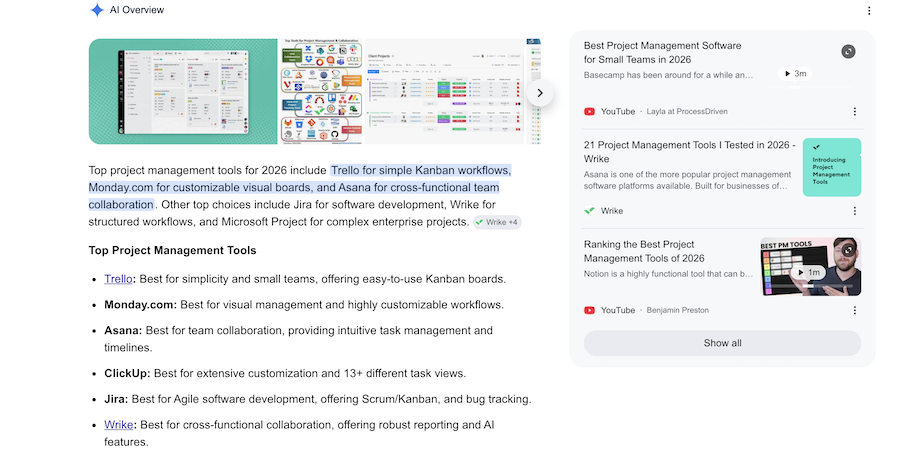
The buyer may click your website (amazing). They may click a citation or buyer guide. They may click your brand name and land on another Google results page. Or they may never leave the SERP at all.
That's why this is not another opinion piece about zero-click search.
It is a tracking process.
This article is the practical workflow: how to track whether Google AI is sending buyers to your site, sending them back into Google, or routing them through third-party sources before they ever reach you.
What we'll cover
TL;DR
To track AI Overview buyer click paths, build a weekly query set around buying-stage searches, then log what actually happens when your brand appears.
For each query, capture:
- Whether an AI Overview appears
- Whether your brand is included
- Where your brand appears in the answer
- Which competitors appear beside you
- Whether your brand mention links to your website, another Google search, a citation source, or nowhere useful
- Which sources Google cites
- Whether ads appear around or inside the AI Overview
- Whether branded search, branded PPC, direct traffic, or assisted conversions move afterwards
The goal is not perfect attribution.
The goal is to build enough consistent evidence to see where buyer attention is going.
Why this tracking problem exists
Google does not give you a clean AI Overview attribution report.
According to Google Search Central’s documentation on AI features, sites appearing in AI Overviews and AI Mode are included in overall Search Console traffic under the normal Web search type.
GA4 also classifies non-ad links from AI Overviews and AI Mode as Organic Search, according to Google Analytics default channel group documentation.
So if a buyer clicks from an AI Overview to your site, that visit does not arrive as a clean “AI Overview” source.
It is folded into Google Organic Search.
And if the buyer clicks something that performs another Google search, they may not leave Google at all.
Google Search Console describes this behavior as a query refinement: a click that performs a new Google search instead of sending the user to an external website. In Google’s documentation on clicks, impressions, position, and query refinements, these links do not count as clicks or impressions for the target site because the user has not left Google Search.
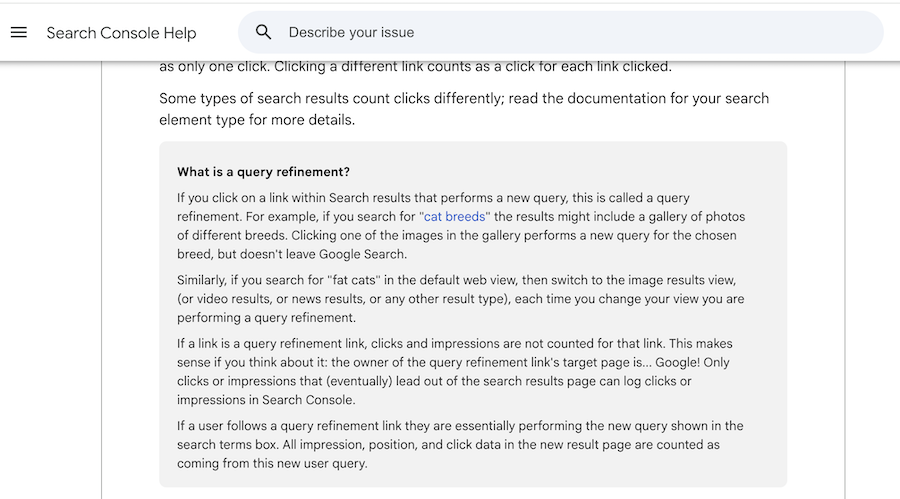
That is the specific measurement gap this workflow is designed to catch.
You are not just asking, “Did we get mentioned?”
You are asking, “What did that mention make possible next?”
How to track AI Overview click paths in 8 steps
Step 1: Build a buyer-query tracking set
Do not start with broad informational keywords.
This workflow is most useful on searches where buyers are comparing options, building a shortlist, or looking for alternatives.
Start with 20 to 30 high-intent queries across your core category, competitors, use cases, and customer segments.
Useful query patterns include:
- Best [category] software
- Best [category] tools
- Top [category] platforms
- [category] software for [industry]
- [category] software for [use case]
- [brand] alternatives
- [competitor] alternatives
- [brand] vs [competitor]
- Best [category] for [company size]
- [category] tools with [feature]
For a SaaS company, that might mean tracking searches around CRM, project management, help desk software, billing, customer support AI, product analytics, marketing automation, call tracking, or whatever category actually drives pipeline.
This matters because AI Overviews are no longer limited to lightweight informational searches.
Semrush’s AI Overviews study found that in January 2025, 91.3% of AI Overview-triggering queries were informational. By October 2025, that had fallen to 57.1%. Over the same period, commercial, transactional, and navigational AI Overview queries all increased.
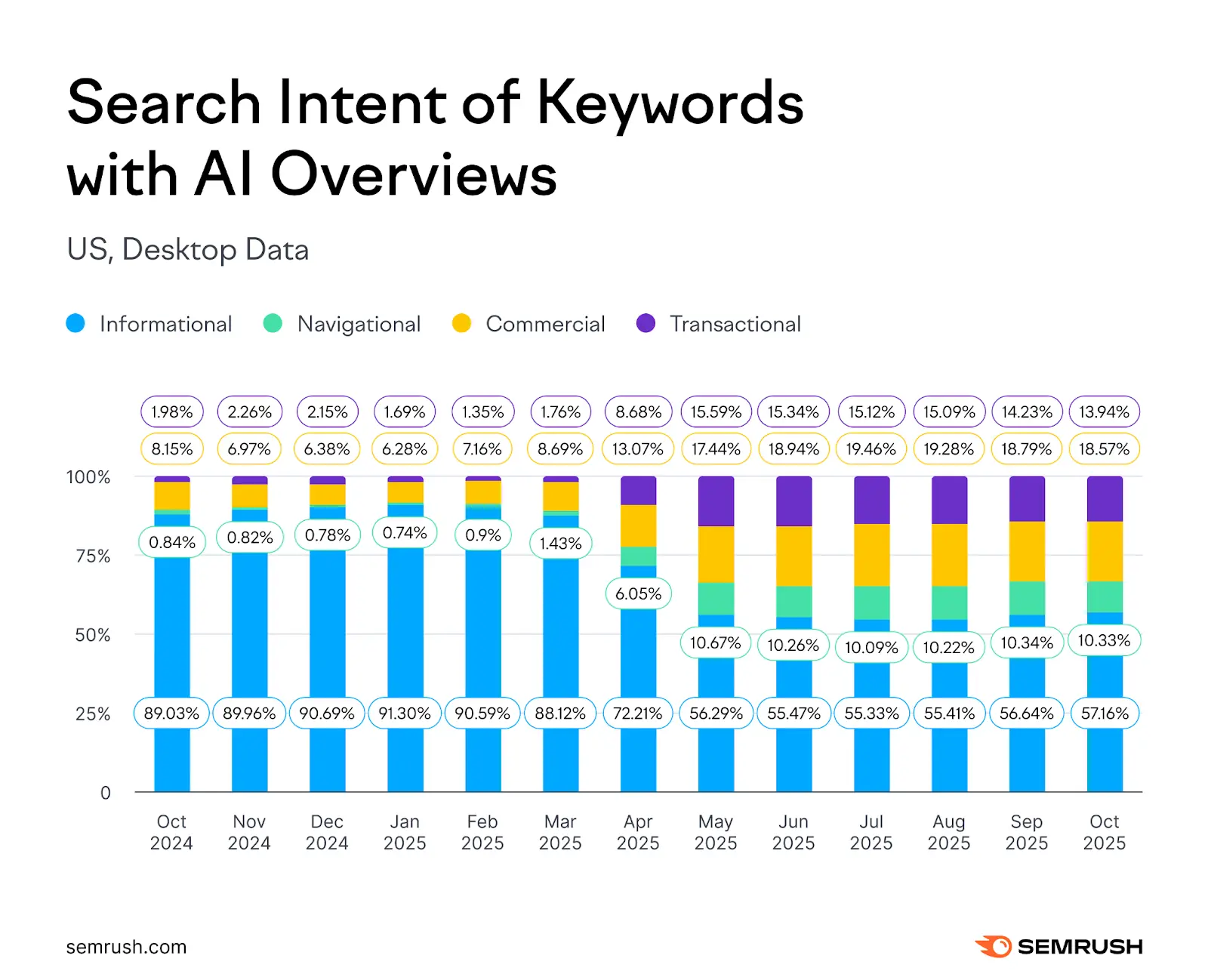
That is why the tracking set should start with buyer-intent searches.
If AI Overviews are moving closer to commercial search, your measurement should move there too.
Step 2: Test the same queries every week
A single screenshot is not a dataset.
AI Overviews change by device, location, signed-in state, interface updates, query phrasing, and sometimes even repeated searches.
So the workflow only becomes useful when it is repeated.
Test the same query set weekly and keep the testing setup as consistent as possible.
For each query, record:
- Query tested
- Date tested
- Device type
- Location
- Browser or testing setup
- Signed-in or signed-out state
- Whether the AI Overview appeared
- Whether it was expanded by default or collapsed
- Whether it appeared above the fold
You can do this manually in a spreadsheet to start.
The point is not to build the perfect SERP intelligence platform on day one.
The point is to stop relying on memory, screenshots in Slack, or one-off observations.
What can be automated, and what still needs manual checking
Some parts of this workflow can be automated.
Tools like Peec AI can help track AI visibility, competitor mentions, prompts, and citation sources across AI search environments. Ahrefs Brand Radar can also help monitor brand visibility across AI responses and search-backed prompts.
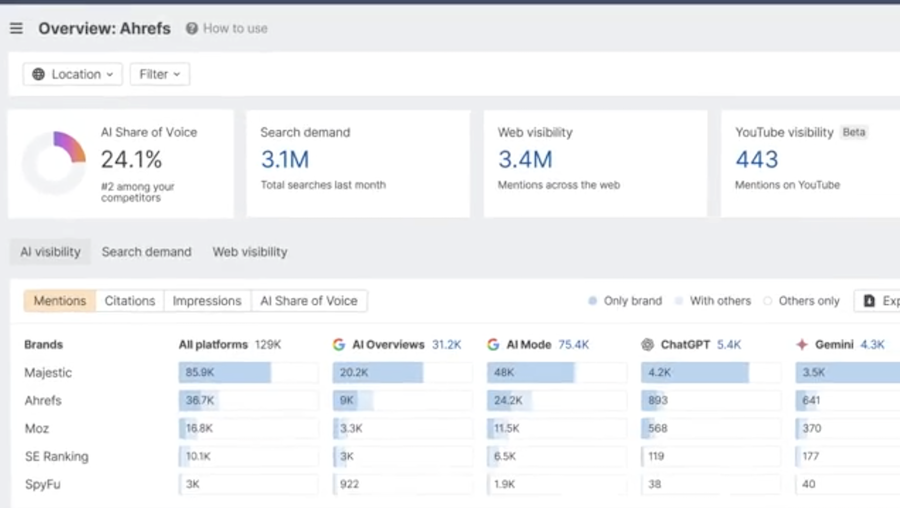
Those tools are useful for answering questions like:
- Are we being mentioned?
- Which competitors are being mentioned?
- Which prompts or queries surface us?
- Which sources are being cited?
- Is our AI visibility improving or declining over time?
But there is still a gap.
Most AI visibility tools are not yet built to show the full click behavior of a specific brand mention inside a live Google AI Overview or LLM answer.
That means they may not reliably tell you whether a brand mention was:
- A direct URL to your website
- A link to another Google search
- A citation link to a third-party source
- A visible mention with no useful click path
That distinction matters because each outcome means something different for attribution.
A direct URL can create a site visit.
A citation link can send the buyer to someone else’s page.
A Google search link can keep the buyer inside Google and make the eventual visit look like branded organic or branded PPC.
A non-clickable mention can create awareness without a measurable session.
So for now, the best setup is usually hybrid:
Use AI visibility tools to monitor mentions, competitors, prompts, and citations at scale.
Then manually check a smaller set of high-value buyer queries to inspect the actual SERP, click behavior, ads, and screenshots.
That manual layer is not a weakness in the workflow.
It is the only way to capture the part standard tools and analytics still miss.
Step 3: Record whether your brand is included
Once you know whether an AI Overview appeared, log your brand visibility inside the answer.
This should be more specific than a yes/no field.
Capture:
- Whether your brand appears in the main answer
- Whether your brand appears only as a source or citation
- Your position in any vendor shortlist
- Which competitors appear
- Whether the mention is positive, neutral, or caveated
- Whether the answer describes your category, use case, or feature accurately
Order matters.
If Google lists five vendors and you appear fifth, that is different from appearing first.
If your competitors are mentioned and you are not, that is also useful data. It tells you to inspect the sources supporting the answer, not just your own website.
This is where AI Overview tracking starts to overlap with brand coverage, review-site visibility, partner mentions, listicles, Reddit threads, YouTube content, and third-party comparison pages.
Ahrefs’ research on AI Overview brand visibility found that branded web mentions had the strongest correlation with AI Overview brand visibility at 0.664, much higher than backlinks at 0.218.
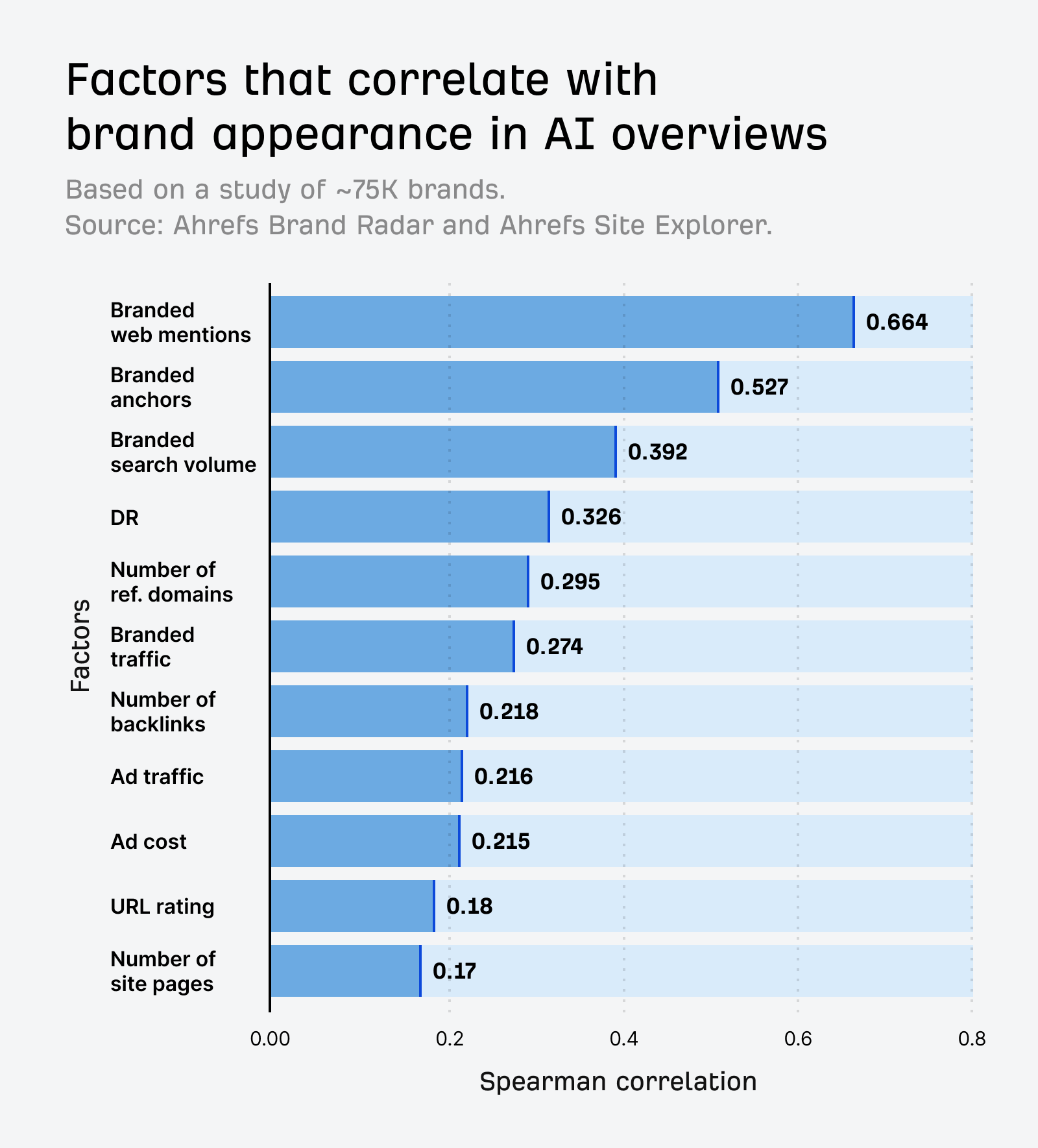
As Ryan Law put it, “Unlinked mentions… have very little impact on SEO, but a much bigger impact on GEO.”
So if your brand is missing from AI Overview shortlists, the issue may not be only your rankings.
It may be that the sources Google trusts are not mentioning you often enough, clearly enough, or in the right context.
Step 4: Classify the link behavior for every brand mention
This is the core of the workflow.
Do not treat every AI Overview brand mention as equal.
For each brand mention, classify what happens when the user tries to take the next step.
Use four buckets.
1. Direct site link
The click goes to the brand website.
This is the cleanest outcome.
It still will not appear as a separate AI Overview channel in standard reporting, but at least the buyer leaves Google and lands on a brand-controlled page.
2. Google search link
The click triggers another Google search for the brand or a related term.
This is the behavior most teams miss.
In plain English, the buyer feels like they clicked your brand.
In reporting terms, they are still inside Google.
That second SERP may include your homepage, your branded ad, competitor ads, review sites, comparison pages, knowledge panels, and more AI-generated content.
This is the specific click path that can make AI visibility valuable while making attribution messy.
3. Citation link
The click goes to a third-party page that supports the answer.
That might be a review site, listicle, Reddit thread, YouTube video, analyst page, marketplace profile, or another cited source.
This can still influence the buyer.
But it means the next step is not happening on your website.
Your visibility then depends on how you are represented on the third-party page Google sends them to.
4. No useful link
The brand is visible, but there is no useful click path attached to it.
This is still awareness.
But it is not traffic.
Do not report it as if it is.
A practical example:
- Query: best CRM software
- AI Overview includes HubSpot
- The brand mention triggers a Google search for HubSpot
- The buyer clicks a branded ad or organic result on the next SERP
In that journey, the AI Overview may have created the discovery moment.
But PPC or branded organic may get the visible credit.
Step 5: Save screenshots with enough context
Screenshots are not optional if you want the data to be credible internally.
They do not need to be beautiful.
They do need context.
For each important result, save:
- The full AI Overview
- The visible citations or source panel
- The ads around the AI Overview
- The destination after clicking a brand mention, where relevant
- The query, date, device, location, and signed-in state
Why does this matter?
Because AI Overview link behavior changes.
In February 2026, Search Engine Land reported that Google introduced more visible link cards inside AI Overviews and AI Mode. Google’s Robby Stein said, “Our testing shows this new UI is more engaging.”
That kind of interface change can alter your data.
If you are not preserving screenshots, you may not know whether a performance shift came from your brand, your competitors, or Google changing the SERP itself.
Step 6: Log the citation sources Google uses
The citation sources are not a side note.
They are part of the measurement system.
For each AI Overview, log which sources appear to support the answer.
Common source types include:
- Review sites
- Affiliate listicles
- SaaS comparison pages
- Reddit threads
- YouTube videos
- Vendor pages
- Documentation pages
- Analyst or marketplace pages
- Community forums
Then look for patterns.
Is Google repeatedly citing the same review site?
Are competitors appearing because they are better represented on category listicles?
Is Reddit shaping the answer?
Are YouTube reviews or tutorials showing up for your category?
This matters because the route to AI Overview inclusion may not be another blog post on your own site.
It may be better third-party coverage, stronger review-site positioning, clearer comparison content, or more visible brand mentions across the web.
Step 7: Track ads around and inside the AI Overview
AI Overview tracking should not live only with the SEO team.
Paid search needs to be part of the analysis.
Google Ads documentation says ads are eligible above, below, and within AI Overviews. Google also says ads inside AI Overviews can be matched using both the user’s query and the content of the AI Overview.
Existing Search, Shopping, and Performance Max campaigns can be eligible for these placements. Advertisers cannot target only AI Overview placements, cannot opt out, and do not get segmented reporting for ads shown inside AI Overviews.
Google Ads has also described these placements as a way to appear “right in the middle of a customer’s critical decision-making process.”
So for each buyer query, log:
- Whether ads appear above the AI Overview
- Whether ads appear below it
- Whether ads appear inside it
- Whether your brand appears in paid results
- Whether competitors appear on your brand or category terms
- Whether review sites or aggregators are also advertising
This helps connect the AI Overview layer with paid search pressure.
Adthena’s paid search analysis found that AI Overviews are increasingly appearing in comparison and instructional spaces. It also found higher CPCs on Technology queries with AI Overviews and lower CTRs in some sectors when AI Overviews were present.
That does not prove AI Overviews will raise your branded CPCs.
But it is enough reason to monitor SEO visibility and PPC pressure together.
Step 8: Watch the downstream signals
The SERP log tells you what happened inside Google.
Your analytics and ad data help you see what may have happened afterwards.
Track these signals separately:
- Branded search impressions
- Branded organic clicks
- Brand + feature queries
- Brand alternatives queries
- Brand vs competitor queries
- Direct traffic
- Assisted conversions
- Branded PPC CPC
- Branded PPC impression share
- Competitor ads on brand terms
- Branded campaign spend
- Branded campaign conversion volume
The pattern to watch for looks like this:
- AI Overview presence increases on buyer-intent queries
- Your brand appears more often in those AI Overviews
- Non-branded category CTR weakens
- Branded search impressions rise
- Branded PPC clicks rise
- Direct traffic rises
- Non-branded SEO conversion credit stays flat or falls
That pattern does not prove exact attribution.
But it does suggest that discovery and credit may be splitting across different parts of the search journey.
That is the point of the tracking system.
You are not trying to claim perfect cause and effect from a single query.
You are trying to build a directional case from repeated evidence.
The weekly tracking sheet
Here is the simplest version of the sheet.
- Query - The exact search term tested
- Query type - Category, alternative, comparison, use case, industry, feature
- AIO present? - Yes / no
- Device - Desktop / mobile
- Location - Country, city, or market tested
- Signed-in state - Signed in / signed out / incognito
- Brand included? - Yes / no
- Brand location - Main answer, shortlist, citation, source panel
- Brand order - Position in the answer or shortlist
- Competitors shown - Names of other brands included
- Brand link behavior - Direct site link, Google search link, citation link, no useful link
- Citation sources - Review sites, listicles, Reddit, YouTube, vendor pages, docs
- Ads present - Above, below, or inside the AIO
- Screenshot link - Folder or file URL
- Notes - Any UI or SERP observations
How to interpret the data without overclaiming
This workflow will not give you perfect attribution.
It will not prove that every branded search came from an AI Overview.
It will not prove Google’s motive.
And it will not tell you exactly how much revenue each AI Overview mention created.
What it can tell you is:
- Which buyer queries trigger AI Overviews
- Whether your brand appears
- Which competitors appear
- Whether your brand mention sends buyers to your site, back to Google, to a citation source, or nowhere useful
- Which third-party sources are shaping the answer
- Whether branded search and paid search pressure move after AI visibility changes
That is enough to make better decisions.
For example:
- If your brand appears but the click goes back to Google, you may need stronger branded SERP protection.
- If competitors appear and you do not, you may need better third-party mention coverage.
- If citations repeatedly come from review sites, you may need to improve those profiles and category pages.
- If branded PPC spend rises after AI visibility improves, you may need to revisit how SEO and PPC share credit.
- If non-branded CTR falls while branded demand rises, you may need to change how you report SEO influence.
The standard here is not courtroom-level proof.
The standard is enough repeated evidence to stop making decisions from incomplete reporting.
A practical 30-day sprint
For most SaaS teams, start with a 30-day sprint.
Week 1: Build the query set.
Pick 20 to 30 buyer-intent searches across category, alternatives, comparisons, use cases, industries, and competitor terms.
Week 2: Run the first SERP capture.
Log AI Overview presence, brand inclusion, competitor inclusion, link behavior, citations, ads, and screenshots.
Week 3: Repeat the same searches.
Look for changes in AI Overview presence, brand order, cited sources, and click behavior.
Week 4: Compare against downstream metrics.
Review branded impressions, branded organic clicks, branded PPC spend, direct traffic, assisted conversions, and non-branded CTR.
At the end of the sprint, summarize what you found in plain English:
- Which buyer queries now trigger AI Overviews?
- Where are we included?
- Where are competitors included instead?
- When we are mentioned, does Google send users to us, back to Google, or to third-party sources?
- Are branded search and PPC signals moving in the same period?
That is your first useful dataset.
Not perfect.
But much better than guessing.
Conclusion
The question is not only whether Google AI recommends your brand.
The question is what happens after it does.
A brand mention can send buyers to your site.
It can send them to a citation source.
It can send them into another Google search.
Or it can create awareness without a useful click path at all.
That is why AI Overview tracking needs to go beyond visibility.
For SaaS teams, the practical next step is simple: build a buyer-query tracking set, test it weekly, classify the link behavior, log the citation sources, and compare the SERP data with branded search and PPC movement.
You will not get perfect attribution.
But you will get a clearer answer to the question that now matters:
Is Google AI sending buyers to you, back to Google, or somewhere else?
Frequently Asked Questions
How do you track whether AI Overviews send buyers to your website?
Track the same buyer-intent queries every week and record what happens when your brand appears.
For each query, log whether an AI Overview appears, whether your brand is included, where it appears, which competitors are shown, what sources Google cites, and what happens when someone clicks the brand mention.
The important part is the click path.
A mention can send the buyer directly to your site, back into another Google search, to a third-party citation source, or nowhere useful.
Can Google Search Console show AI Overview traffic separately?
No. Google does not give you a clean AI Overview traffic report in Search Console.
Clicks from AI Overviews are included within normal Web search reporting. GA4 also tends to classify non-ad AI Overview visits as Google Organic Search.
That means you can see the traffic after it reaches your site, but you cannot isolate AI Overview clicks as a separate channel by default.
What is an AI Overview click path?
An AI Overview click path is the next step a user takes after seeing a brand, product, or source mentioned in Google’s AI-generated answer.
There are four common outcomes:
- The click goes directly to your website
- The click triggers another Google search
- The click goes to a third-party citation source
- The brand is visible, but there is no useful link
This matters because all four outcomes can influence the buyer, but only one creates a clean website visit.
Why do AI Overview citation sources matter?
Citation sources show which pages Google is using to support the AI Overview answer.
Those sources might be review sites, listicles, Reddit threads, YouTube videos, vendor pages, documentation pages, analyst sites, marketplaces, or forums.
If competitors are being mentioned in those sources and you are not, your issue may not be your own website. It may be a lack of third-party brand coverage in the places Google is using to form the answer.
Can AI Overview tracking prove revenue attribution?
No. AI Overview tracking will not prove that every branded search, direct visit, or conversion came from an AI Overview.
But it can build a useful pattern.
If AI Overview visibility increases, your brand appears more often, branded search rises, branded PPC clicks increase, and non-branded CTR weakens, that suggests discovery and attribution may be splitting across the search journey.
The point is not perfect attribution.
The point is enough repeated evidence to see whether Google AI is sending buyers to your site, back into Google, or through third-party sources.
.png)
Latest articles
What we've published in the past 30 days — across SEO, GEO, content, and digital PR.