SEO
Calculating...
Aug 2026
Schema SEO for SaaS Company - Implementation Guide
Confused about schema markup for your SaaS product pages? This guide walks you through every step to implement it effectively and improve search visibility.


Most SaaS companies miss out on 20-40% additional clicks because they skip structured data (schema).
Without schema markup, search engines can't tell if your "Apple" is the tech company or the fruit.
And when AI search tools like ChatGPT or Perplexity scan the web, they favor sites with clear, structured information.
So, let's fix that. In this article, we’ll talk about the essential schema types, properties, and examples for SaaS, and explain how to implement schema SEO for your SaaS company.
What We’ll Cover
TL;DR - How to Implement Schema Markup for Your SaaS Company
Here's what you need to do to add structured data to your website:
- Add SoftwareApplication schema to your product pages (include your product name, pricing, and customer ratings).
- Put the Organization schema on your homepage with your company info and social profiles.
- Use the FAQPage schema on your help pages and support articles.
- Add Article schema to your blog posts with author names and publish dates.
- Add your JSON-LD code in the <head> section of each page (this is the easiest way).
- Run everything through Google Rich Results Test before you publish.
What Does Schema Markup Mean for a SaaS Company?
Schema markup acts as structured labels that help search engines interpret your content accurately.
Google, Microsoft, Yahoo, and Yandex created Schema.org in 2011 as a shared language. When you use it, you're speaking directly to search algorithms instead of hoping they guess correctly.
For SaaS companies, this matters because you're selling invisible products.
A project management tool, CRM, or analytics platform doesn't have a physical form. Schema bridges that gap by defining your software's features, pricing, and purpose in a way machines understand.
So what does this mean for you in practice? When you add schema markup to your site, search engines can display:
- Star ratings right in the search results
- Your pricing before anyone even clicks
- Feature lists and screenshots
- Your company details in the knowledge panels
- FAQ answers directly on the search page
Without a schema, you're just one of the 10 blue links. With it, you get rich snippets that make your listing stand out.
And in B2B SaaS, where trust matters, that visibility builds credibility fast.
The data backs this up.
Google's Knowledge Graph contains over 1.6 trillion facts about 54 billion entities. A schema helps your SaaS product become one of those recognized entities instead of getting lost in generic search results.

Essential Schema Types for SaaS Businesses
Not all schema types matter for SaaS.
Focus on these four first:
- SoftwareApplication Schema: This is your primary schema. Use it on product pages, landing pages, and anywhere you describe your software. Google requires three properties: name, price, and either ratings or reviews. For cloud SaaS, use the WebApplication subtype.
- Organization Schema: Put this on your homepage and about page. It tells search engines who you are as a company. Include your logo, founding date, social media profiles, and contact details.
- FAQPage Schema: Google restricted FAQ rich snippets in August 2023 to government and health sites. But the FAQ schema has one of the highest citation rates in AI-generated search results. Also, if you want to rank in ChatGPT, Perplexity, or Google AI Overviews, know that they favor content with a clear question-and-answer structure.
- Article and BlogPosting Schema: Every blog post should have this. Include author information, publish date, modification date, and featured images. Search engines use these signals to determine content freshness and authority.
Other useful types include BreadcrumbList for navigation, HowTo for tutorials, and VideoObject for demo content.
But start with the four above. They'll give you 80% of the results with 20% of the effort.
Schema Markup Properties Critical for SaaS
Once you pick your schema type, you need to fill in the properties.
For SoftwareApplication:
The name property should match your product's actual name. If you call your tool "Acme Analytics," then that's exactly what you should put here.
Pricing goes in the ‘Offers’ property. Use AggregateOffer if you have multiple pricing tiers. Set the price to "0" for freemium products, then include priceCurrency as USD or your local currency.
Add operatingSystem to specify "Web Browser" for cloud tools or list specific platforms. The applicationCategory might be BusinessApplication, ProductivityApplication, or FinanceApplication, depending on your product.
Screenshots help. Google can display these in rich results, giving potential customers a preview before they click.
For Organization:
Your URL should be your canonical domain. The logo must be a direct link to your brand mark, ideally square and at least 112x112 pixels.
The contactPoint property includes customer service details. AI search tools use this to provide accurate contact information in their responses.
List all your social profiles in the sameAs field. Include LinkedIn, Twitter, Facebook, and YouTube. And don’t forget your Crunchbase, Product Hunt, or AngelList pages.
Each verified link strengthens your entity recognition.
For FAQ Page:
Structure each Q&A pair properly. The question goes in name, the answer in acceptedAnswer.text.
Keep answers between 50 and 300 words for the best AI citation rates.
For Article schema:
Always include datePublished and dateModified. Here's why: search engines and AI systems love content that's either fresh or gets updated regularly.
The author property lets you link to a Person schema for whoever wrote the piece, which adds credibility.
Use a headline for your article title, description for your meta description, and an image for your featured image.
These properties help with search engines or AI search visibility, and social platforms use them too when people share your content.

How to Implement Schema Markup for your SaaS Website
You have three format options: JSON-LD, Microdata, and RDFa.
Google recommends JSON-LD because it's the cleanest and doesn't mess with your visible HTML.
Step 1: Choose Where to Add Code
Place your JSON-LD schema in the <head> section of your HTML.
Here's the basic structure:
<script type="application/ld+json">
{
"@context": "https://schema.org",
"@type": "SchemaType",
"property": "value"
}
</script>
Step 2: Map Schema to Pages
Different pages need different schema types:
- Homepage gets Organization and Website schema.
- Product pages need a SoftwareApplication.
- Pricing pages use Product with pricing details.
- Blog posts require Article or BlogPosting.
- Help centers benefit from FAQPage and HowTo.
Step 3: Generate Your Code
You can write a schema manually or use generators.
Technical SEO tools like Schema Markup Generator by dentsu speed things up. Just fill in your details and copy the code.
Using ChatGPT to Generate Schema Markup
You can use ChatGPT to create schema markup without plugins or writing code from scratch. Just ask it directly for what you need.
For example:
"Generate JSON-LD schema for SoftwareApplication with pricing tiers and reviews."
ChatGPT will generate valid JSON-LD code you can copy and paste directly into your site.
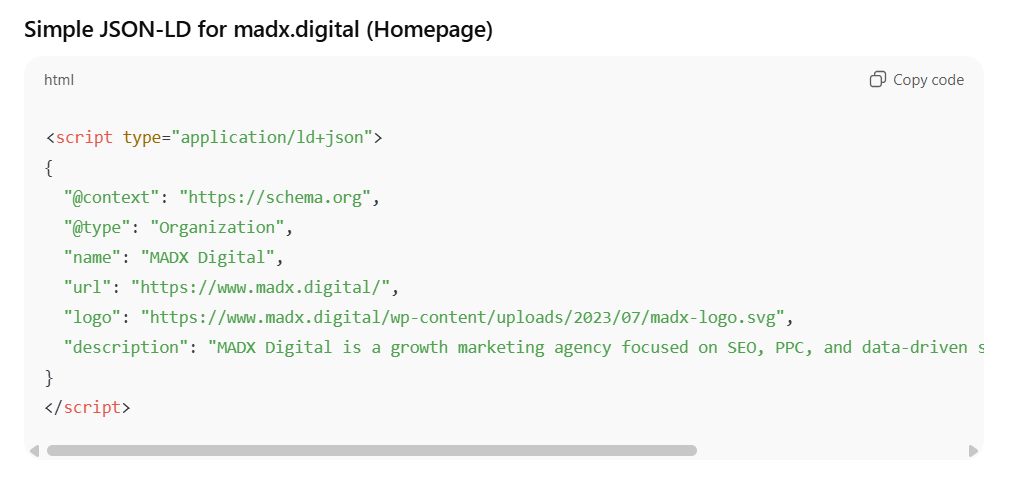
And the best part is that you can fine-tune the output by giving it more details.
Want to add specific properties? Just ask.
Need three FAQ pairs for your help page? Give ChatGPT your questions and answers, and it'll format everything correctly for you.
Step 4: Add to Your Site
How you do this depends on what platform you're using:
- For WordPress: Use plugins like Rank Math SEO or All in One SEO. They'll add schema automatically based on what type of content you're creating.
- For Webflow: Head to Page Settings, then Custom Code, and paste your JSON-LD in the Head section. You can use CMS fields to make your schema dynamic across template pages.
- For Next.js or React apps: Inject schema using dangerouslySetInnerHTML in your component return statements.
Google Tag Manager works too. Just create a Custom HTML tag with your schema code and set it to fire when the page loads.
Step 5: Avoid Common Mistakes
Don't use relative URLs. Always include the full path starting with https://.
Don't copy the schema from your competitors without changing the details. Google can penalize you for duplicate or misleading structured data.
Don't add schema for content that doesn't exist on the page. If you mark up FAQs, those questions and answers must be visible to users.
Schema is just one piece of your SEO efforts.
Want a complete layout that covers everything from technical fixes to content strategy? Our 90-day SEO roadmap shows you exactly what to prioritize each month.
We're confident enough in this approach that if your website isn't ranking in Google's top five positions for your three chosen keywords within 90 days, we'll refund your project fee, excluding content and link costs, which you keep.
Book a call to see how we can accelerate your organic growth.
Schema Markup Examples for SaaS Companies
Real code examples make this concrete. Here's what to actually implement:
Software Application Schema Example:
<script type="application/ld+json">
{
"@context": "https://schema.org",
"@type": "SoftwareApplication",
"name": "ProjectFlow",
"operatingSystem": "Web Browser, Windows, macOS",
"applicationCategory": "BusinessApplication",
"description": "Team collaboration and project management software",
"offers": {
"@type": "AggregateOffer",
"priceCurrency": "USD",
"lowPrice": "29",
"highPrice": "199",
"offerCount": 3
},
"aggregateRating": {
"@type": "AggregateRating",
"ratingValue": "4.7",
"reviewCount": "856",
"bestRating": "5",
"worstRating": "1"
}
}
</script>
Organization Schema Example:
<script type="application/ld+json">
{
"@context": "https://schema.org",
"@type": "Organization",
"name": "YourCompany Inc",
"alternateName": "MyCompany Inc",
"url": "https://www.yourcompany.com",
"logo": "https://www.yourcompany.com/logo.png",
"contactPoint": {
"@type": "ContactPoint",
"telephone": "+1-555-123-4567",
"contactType": "customer service",
"contactOption": "TollFree",
"areaServed": ["US","GB"],
"availableLanguage": "en"
},
"sameAs": [
"https://twitter.com/yourcompany",
"https://www.linkedin.com/company/yourcompany"
]
}
</script>
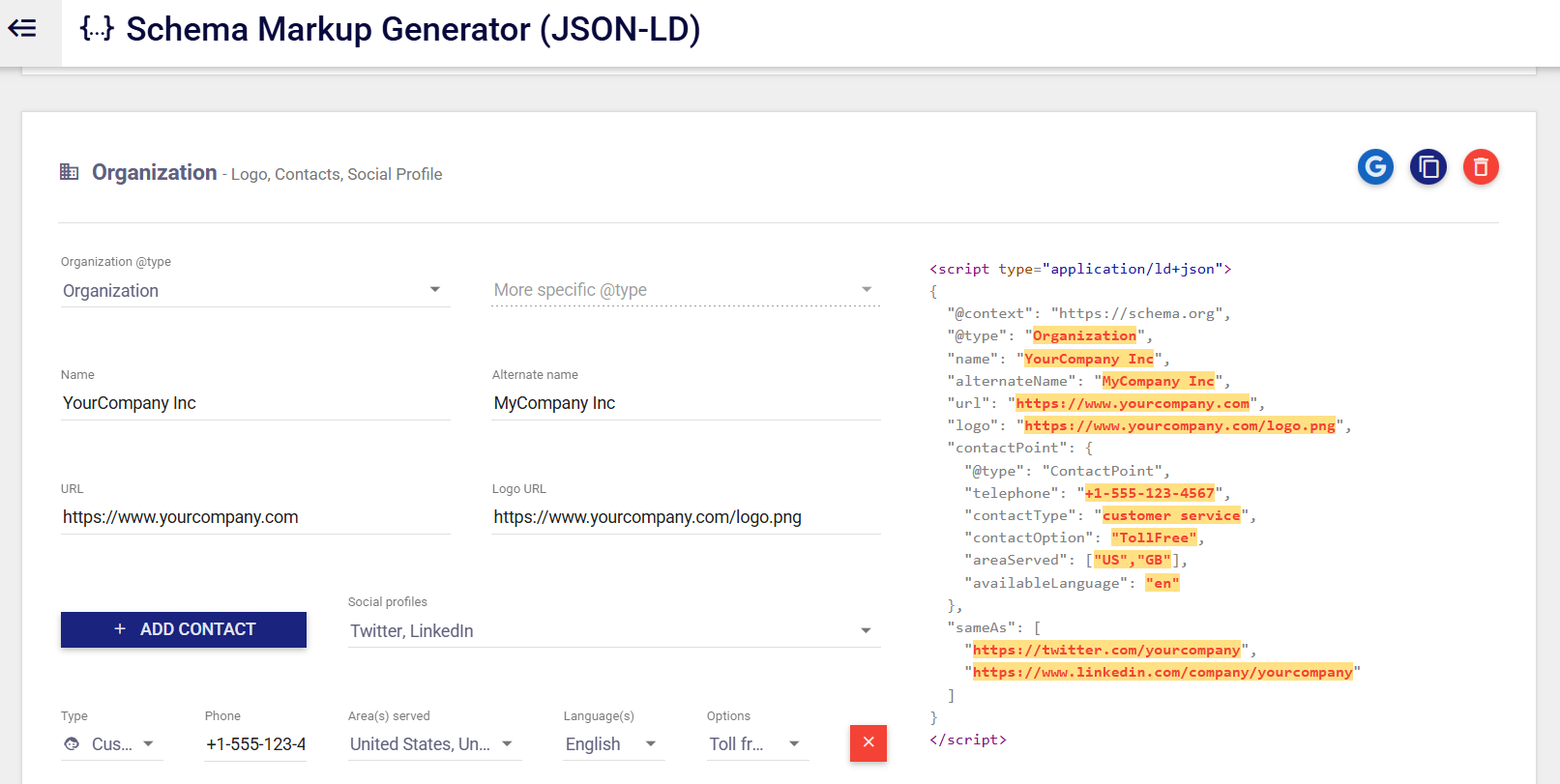
FAQPage Schema Example:
<script type="application/ld+json">
{
"@context": "https://schema.org",
"@type": "FAQPage",
"mainEntity": [
{
"@type": "Question",
"name": "What's included in the free trial?",
"acceptedAnswer": {
"@type": "Answer",
"text": "The 14-day free trial includes full access to all features with no credit card required. You can invite up to 10 team members and create unlimited projects."
}
},
{
"@type": "Question",
"name": "Can I cancel anytime?",
"acceptedAnswer": {
"@type": "Answer",
"text": "Yes. You can cancel your subscription at any time from your account settings. There are no cancellation fees or long-term contracts."
}
}
]
}
</script>
These examples show the minimum required properties. Add more details, such as a screenshot, software version, or founder information, as needed.
How to Test and Validate Your Schema Implementation
Adding schema markup to your website is meaningless if it contains errors. Test before and after deployment:
- Use Google Rich Results Test: Visit https://search.google.com/test/rich-results and drop in your URL or paste your code. This tool will tell you if your schema qualifies for rich results and show you a preview of how it might look in search. It'll catch missing required properties, wrong data types, and syntax errors. Fix anything it flags as an error. Warnings are optional, but you should probably address those, too.
- Check with Schema Markup Validator: Visit https://validator.schema.org for a second opinion. This validator tests against the full Schema.org vocabulary, not just what Google supports. Use it to catch typos in property names or incorrect schema types. The validator is stricter than Google's tool, which helps ensure your markup is technically perfect.
- Monitor in Google Search Console: After deploying schema, check Search Console's Enhancements section. Look under "Unparsable structured data" for errors on live pages. Google takes 1-7 days to crawl and index your schema. The Enhancements report shows which pages have valid schema, which have errors, and which qualify for rich results.
Here are some common errors to fix:
- Missing Required Fields Like Price or Image: Add them even if you have to use placeholder values.
- Invalid URLs: Every URL must be complete with https:// and no typos.
- Wrong Date Formats: Use ISO 8601 format: "2025-01-14" for dates, "2025-01-14T10:30:00Z" for timestamps.
- Mismatched Schema Types: Don't mark a blog post as a Product or a product page as an Article.
- Test After Every Change: Schema errors can prevent rich results entirely, so validation isn't optional.
Work with MADX Digital to Scale Your Organic Growth
Schema markup works best as part of a complete visibility strategy, not a one-time implementation. Your competitors are already optimizing for both Google and AI search, earning citations in ChatGPT and Perplexity.
You need experts who understand how schema fits into the bigger picture.
At MADX Digital, we help B2B SaaS companies build organic growth systems that work across search engines and AI platforms. Schema implementation is part of our technical SEO foundation, but we go further with content strategies, link building, and GEO optimization that drive demo calls and trial signups.
Our clients see results in 90 days, not two years. Schedule a free SEO and AI visibility audit to see where your setup stands.
Frequently Asked Questions
Does Schema Improve SaaS Rankings Directly?
No. Google's Danny Sullivan confirmed in October 2023 that schema doesn't boost rankings directly. John Mueller said the same thing back in 2018.
But schema can increase click-through rates when you earn rich results. Higher CTR sends positive engagement signals to Google, which can improve rankings over time.
Gary Illyes from Google explained it well: "It will help us understand your pages better, and indirectly, it leads to better ranks in some sense."
How Long Does It Take for Schema SEO to Show Results?
Google typically indexes new schema within a few days for sites it crawls regularly. You'll see your structured data in Search Console reports within a week. Rich results take longer. Expect 3-8 weeks before Google consistently displays your enhanced listings.
Speed it up by requesting indexing through Search Console's URL Inspection tool. Fix any errors immediately because Google won't show rich results for pages with schema problems.
Can Schema Help SaaS Companies Appear in AI Search Results?
Yes. This is becoming more important than traditional SEO benefits.
AI search tools like ChatGPT, Perplexity, and Google AI Overviews use Retrieval-Augmented Generation. They scan the web for content, then synthesize answers.
Schema markup makes your content machine-readable, helping AI systems understand and cite it accurately.
Is Schema Required for B2B SaaS Websites?
Technically, no. But you're putting yourself at a serious disadvantage without it.
In competitive SaaS markets, rich results have basically become expected. Chances are, your competitors are already using schema markup to stand out.
And think about how B2B buyers actually make decisions. They're doing extensive research, comparing you against other options, and looping in multiple stakeholders.
Schema helps you show up in that research process with more information right from the start.

Latest articles
What we've published in the past 30 days — across SEO, GEO, content, and digital PR.
.png)